External System Integration - ApiForms
BzCtrl. provides the ability to call predefined Forms through API communication using the ApiForms feature. This allows external systems to create and link Form instances directly from within their own operational processes.
The main value of ApiForms is that a user can launch a specific Form directly from the source system, while the created Form instance remains permanently accessible through a stored URL within that source system.
How ApiForms Work
Each ApiForm provides a unique API endpoint that allows an external system to create a new Form instance in BzCtrl.
The request includes:
- Predefined Form reference (via API Endpoint)
- Tags and identifiers (for example an Order Number, Shipment Number, or Case ID).
Once the Form instance is created, BzCtrl. returns a response containing the direct URL to the Form instance. This URL can then be stored in the source system, allowing users to always reopen the corresponding Form directly from their operational process.


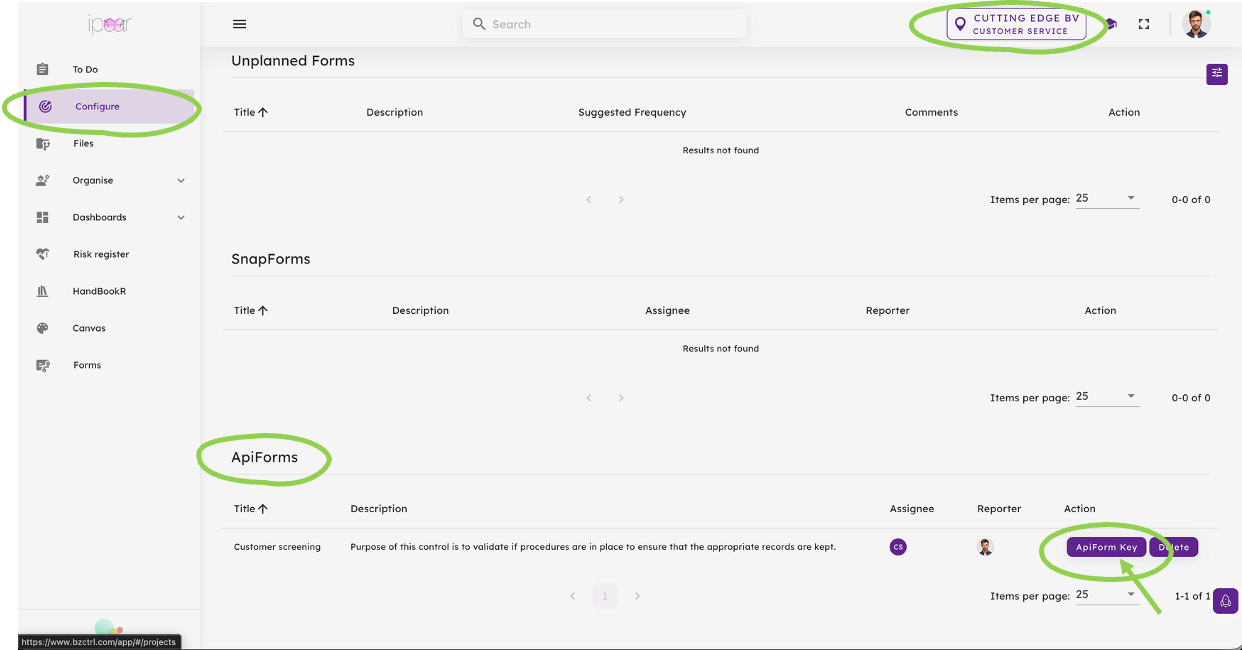
Step 3 - From the Configure page the Form is now available as ApiForm. Please make sure the correct Workspace is selected (right top). From the ApiForms Table select the ApiForm Key Button to get the details to share with your developers.