
Calculations Taxes
This page describes how we calculate the tax amounts (import duties / excise / VAT etc).
Source of Products & Measures data
The data needed to calculate the tax amounts is refreshed every night using the following API for each unique taric code that we created in the CMS system. The code that uses this data to calculate the taxes is available in our package cu_tax_calculation.
Example API call to Bzctrl:
Gets the data for 2 different products, including that of their parents:
We always need the data of the parent also because any measures etc on the parent are inherited by the childs.
The response is a whole datamodel including codelists, footnotes, goodsnomenclatures, geograpahical areas, measures etc.
The input data
The input for the calculation is:
Calculation of Import duties
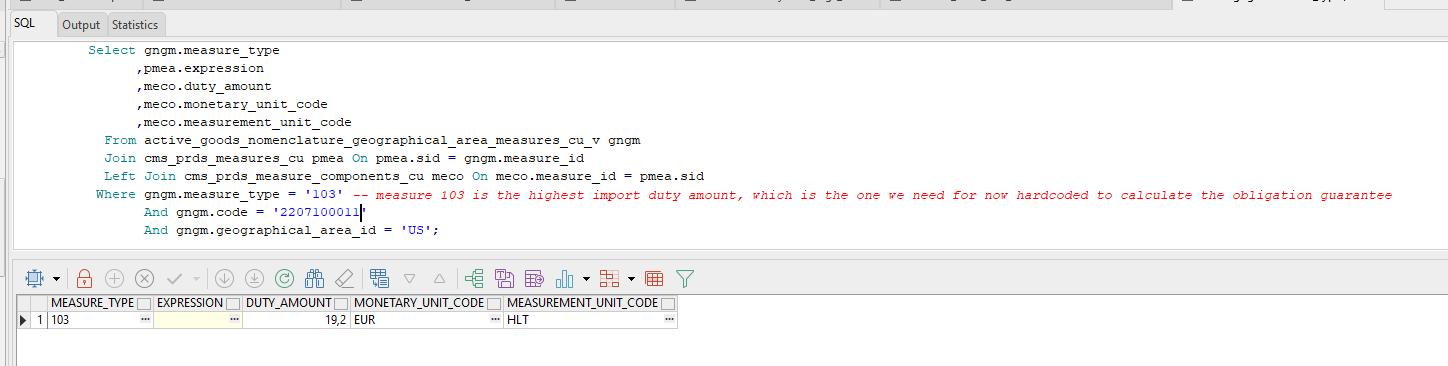
Based on the taric code and origin, we now always get the measure 103 (third country duties). For this measure we get the expression and the measure components:
Then based on the measurement_unit_code that we find, we fetch the correct quantity from the input. So in this example its HLT(hectoliters). Customs does not specify if HLT is at 15 degrees C or at 20 degrees C. In this case we grab the liters at 20 degrees C from the input by default (if not specified by customs for the unit) and divide it by 100.
This is the logic for getting the correct quantity from the input:
.png)
If there is a measurement unit like HLT then we multiply the quantity specified in this unit with the duty amount.
If there is no measurement unit like HLT then we multiply the Customs Value with the duty amount percentage.
.png)
Calculation of Excise and Stock Tax
For excise and stock tax we calculate it in a similar way, but we get the measure based on origin and taric code and type=NLACC for excise or type=NLACVH for stock tax and the additional code like U340. This U-code is set by the system if there is only 1 available for the taric code, but if there are more than one U-codes the user has to set the correct one for the taric code in our product setup.
The difference here is that the expression can be filled.
.png)
The expression can be something like ?$Rate=(?ASV*AMOUNT(18.27,"EUR"))/100.00; $Base=?060; [$Base, $Rate, AA,060]?
To dynamically be able to calculate the tax based on the expression (we can now handle all the different expressions) we first extract the base unit of measure:
.png)
Also this is not always the same format, sometime its &BASE1, sometimes its $Base etc. The unit can be 063 or 060 for example, which we then map on Liters at 15 degrees C or Liters at 20 degrees C from the input.
Then we transform the expression into a usable calculation:
.png)
Then based on the calculation and the quantity we calculate the amount to be paid.
Excise is not always based on an expression, if its not we calculate it in the same way as the import duties (fetch the duty amount and multiply it by the quantity).
Calculation of VAT
For VAT we get the percentage based on the type=NLBTW and the additional code (U340 in this case) and the taric code and origin.
Then we just apply this percentage.
.png)
Calculation of Obligation Guarantee
For the calculation of the obligation guarantee we combine the calculated Import duties, Excise, Stock tax and VAT like so:
.png)
We calculate the vat based on the customs value + import duty amount + excise amount multiplied by the VAT percentage.
Then we round all the taxes on 2 decimals just like the customs website does and sum it all up.
Obligation guarantee = Import Duties + Excise + Stock tax + VAT
No Comments