Update Annex AO/IC ATLAS-CMS
- Introduction
- Abbreviations
- Terminal Management System
- Compliance management
- Reporting
- Technical specifications
Introduction
- Commodity code;
- Customs status;
- Origin (preferential and non-preferential); and
- Reference numbers / cargo document data, among which customs documents.
Abbreviations
| AO/IC | Document describing the Administrative Organization and Measures of Internal Control, to which this document is an annex. |
| CGT | Customs and Global Trade. |
| CS | Customer Services team. |
| CMS | Compliance Management System. |
| CPM | Commercial Policy Measures |
| DMS | Customs Management System of the Dutch Customs authorities used for lodging customs declarations and messages. |
| EIDR | Entry Into the Declarants Records |
| NoP | Notification of Presentation message to present goods to Customs. |
| MAB | Notice Expiration of Payment Term. |
| OPS | Operations team. |
| SKU | Stock Keeping Unit |
| TMS | Terminal Management System. |
| TSD | Temporary Storage Declaration (i.e. practically the customs declaration done by the agent on behalf of our customers, prior to the goods arriving at our terminal). |
Terminal Management System
In this Chapter we focus on the role that our TMS - ATLAS plays in the process of governance. ATLAS is where data is received from in the CMS and where a User is informed on the outcome of the Customs processes.
Fundamentals
Overview
.png)
Core System Concepts
The system is based on a set of core concepts that together represent the physical and administrative handling of Product within terminal operations.
- Visit – Represents a Means of Transport (MOT) and its time of arrival. A single MOT may execute multiple Visits over time. Visits form the temporal and operational entry point for incoming or outgoing Product flows.
- Product – Represents the physical substance (molecules) being handled, such as bulk liquids. Product is the base physical entity on which all operational and administrative processes are applied.
- Storage Unit – Represents a physically segregated storage entity for Product. Storage Units ensure physical separation of Product and define how it is stored. Examples include:
- A Tank, which is a single Storage Unit;
- A Vessel, which may contain multiple segregated Storage Units;
- A Train, where wagons function as individual Storage Units;
- A Truck, where separate compartments can each represent distinct Storage Units containing different Products.
- Location – Defines where Activities are executed. Locations are relevant for operational control and for compliance with applicable licenses and regulatory requirements.
- Activity – Represents all operational actions performed on Product within the system. Activities include all forms of handling, transformation, movement, storage, or processing of Product across Visits, Storage Units, and Locations.
Together, these concepts form the foundational structure for representing physical flows and their administrative and compliance-related processing within the system.
Activities
For each Activity, whether a Movement or a Service, ATLAS provides information on all Products involved. In the case of Services, where no physical transfer of goods takes place between locations, the data relates to Parcel information within a Storage Unit (for example, a Tank or a Vessel). In the case of a Movement, at least two Storage Units are involved, and ATLAS provides Parcel data for all Products participating in the transfer between these Storage Units.
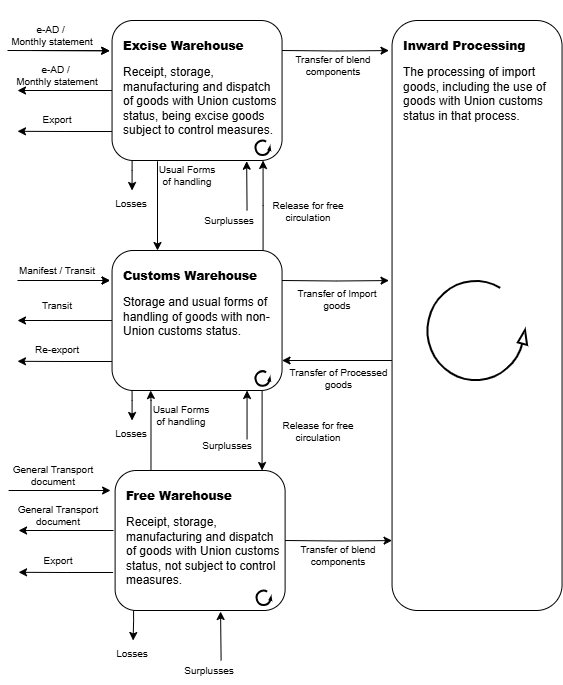
As further described under “Business Process”, the following list of Activities is used to support the record-keeping requirements from a customs compliance perspective:
- Movement;
- Services:
- Take in quantity;
- Rebrand;
- Import;
- Administrative Stock Transfer;
- Shifting service;
- Commodity code correction;
- Departure.
Business process
General
In ATLAS, these Activities are initiated through:
- Movements. Which concerns physical movement of goods; and/or
- Services. Basically any activity that is not a Movement.
An Activity is either a Movement or a Service. Whenever it does not concern a physical Movement of goods, it concerns a Service.
Product registration
- validate if the concerned Product falls within the scope of our licenses;
- check if certain prohibitions / restrictions apply;
- what documents can be expected; and
- if the Product may be eligible for a Preferential rate.
The Cargo Document functionality enables the capture and recording of data from physical documents or incoming electronic messages required to support business processes from a compliance perspective, with the source document serving as the basis for all entered information.
Movements
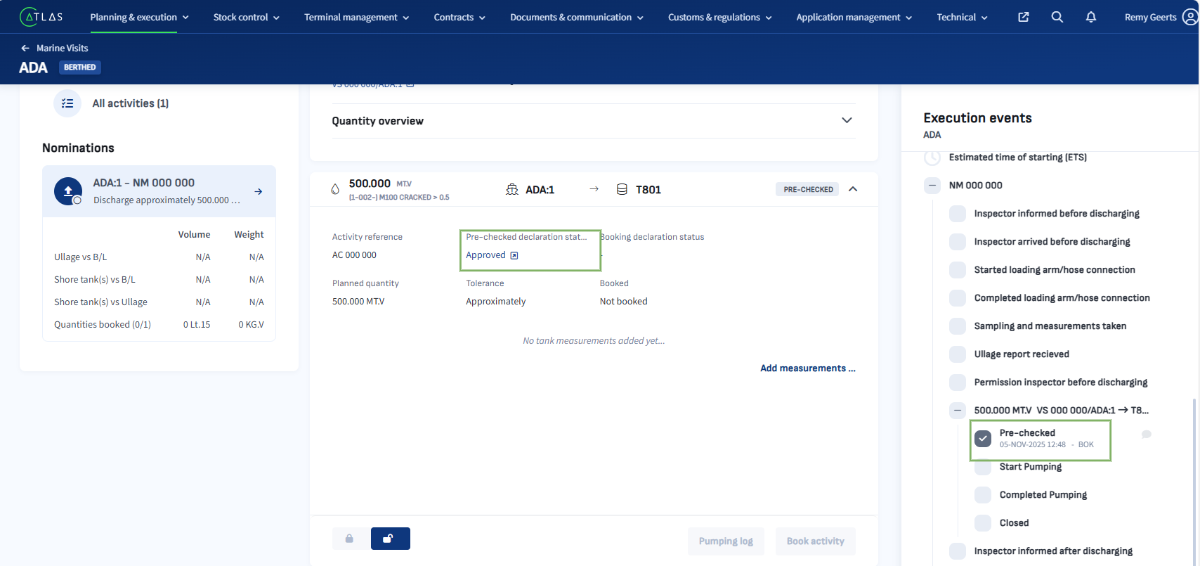
Checks at Release to OPS are based on current data and are informational only, as actual execution may differ, and any resulting consequences requiring attention are highlighted at this stage.
Check at Release to OPS yet to be developed for ETA go-live
Services
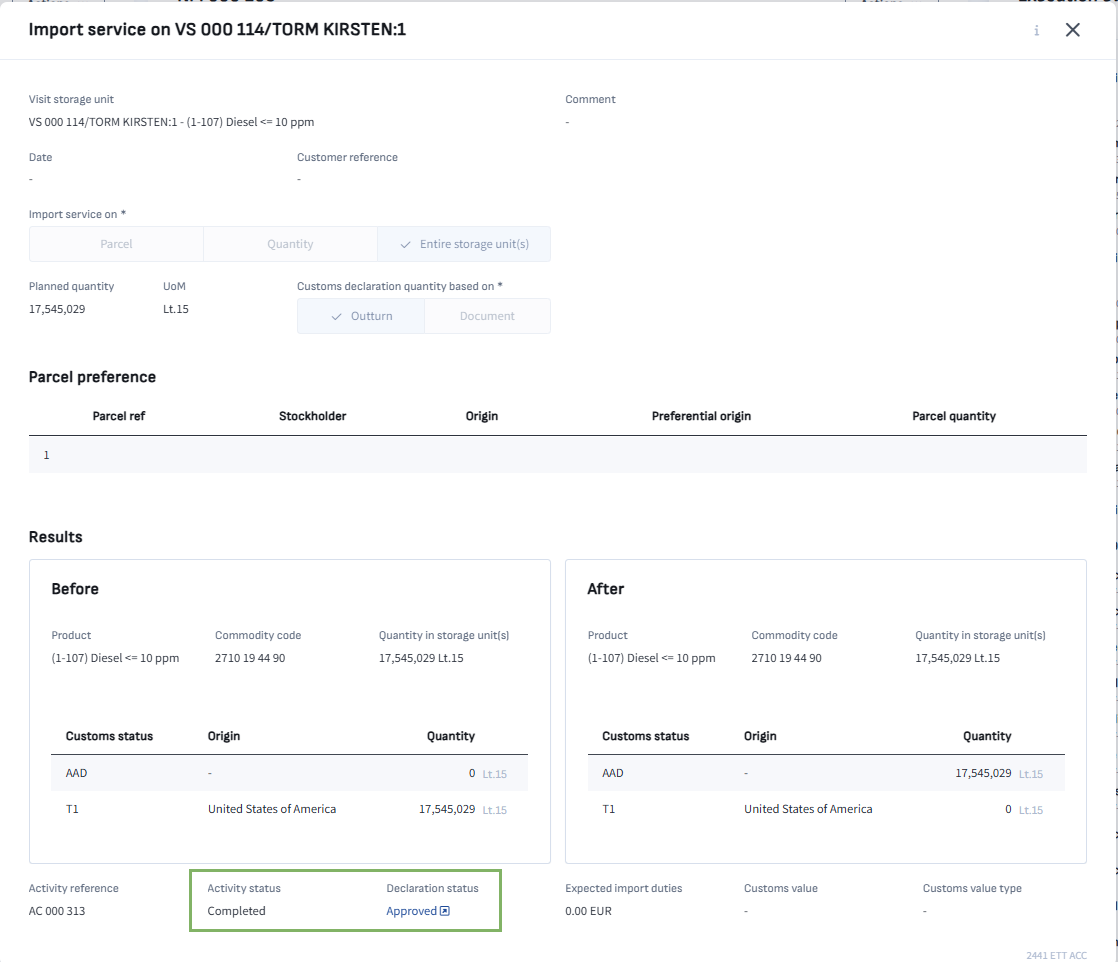
- It concerns Products classified mainly on the basis of their aromatic content. Different approved methods apply, whereby the results can be different. We have seen some instances where the different methods lead to slightly different results, but with a difference that does matter for the classification;
- Lines are never completely empty. Sometimes this can lead to slight changes in sulphur content for example, where again these minimal changes are decisive for classification purposes.


Parcel administration
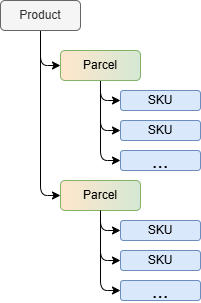
The parcel administration model distinguishes between three separate business concepts: Product, Parcel, and Stock Keeping Unit (SKU). Although a Parcel may in some situations correspond to a single SKU, these concepts are fundamentally different and can not be treated as interchangeable within the system.
The three layers are defined as follows:
- Product – The physical commodity handled at the terminal, such as gas oil, gasoline, or naphtha.
- Parcel – The administrative representation of a physical product. A Parcel records characteristics such as commodity code, customs status, origin, cargo documents and, where applicable, consignor or consignee information.
- Stock Keeping Unit (SKU) – An administrative unit used for inventory management and record-keeping purposes. SKUs support stock administration but do not define the legal or logistical identity of a Parcel.
Parcel creation for incoming products
For incoming products, the User registers the received physical product by creating one or more Parcels. Each Parcel serves as an administrative reflection of the product and captures attributes such as the commodity code, customs status, and origin.
These attributes alone do not determine the number of Parcels that must be created. Even where multiple quantities of product share identical administrative characteristics, the User may decide to register them as separate Parcels. Consequently, the creation and granularity of Parcels for incoming receipts are driven by the User's administrative requirements rather than solely by the product characteristics.
Parcel creation for outgoing products
The same principle applies to the dispatch of goods. When product is loaded for shipment, the User creates one or more Parcels to represent the administrative distribution of the physical product.
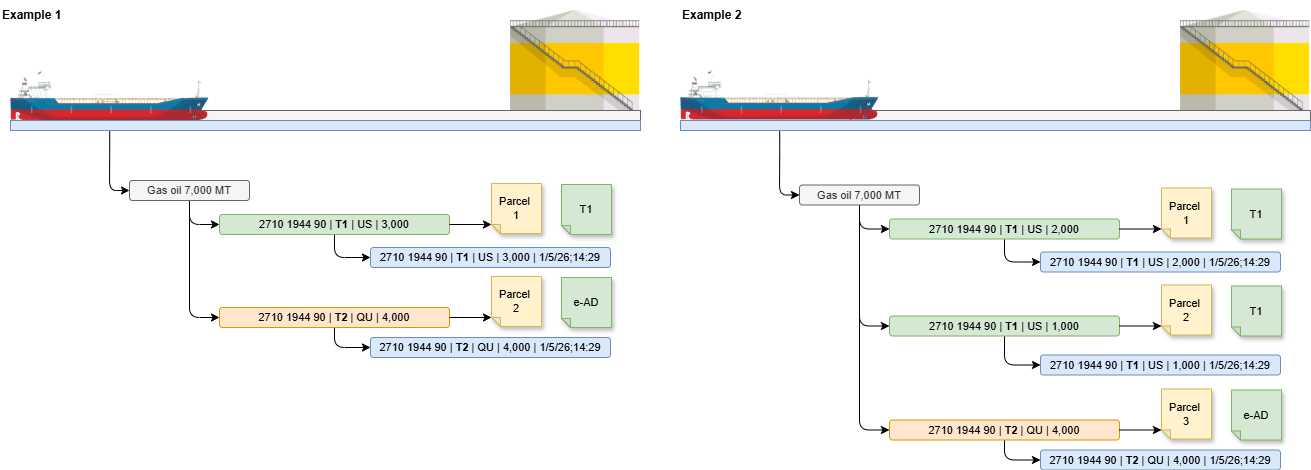
For example, 9,000 MT of gasoil with a T2 (Union) - Excise controlled customs status may be loaded (Movement), where the Product is destined for 3 different destinations (Departure). Although all quantities have the same commodity code, customs status, and origin, separate Parcels are created because they are intended for different consignees. The User determines the required Parcel structure based on the operational and documentary requirements of the shipment.
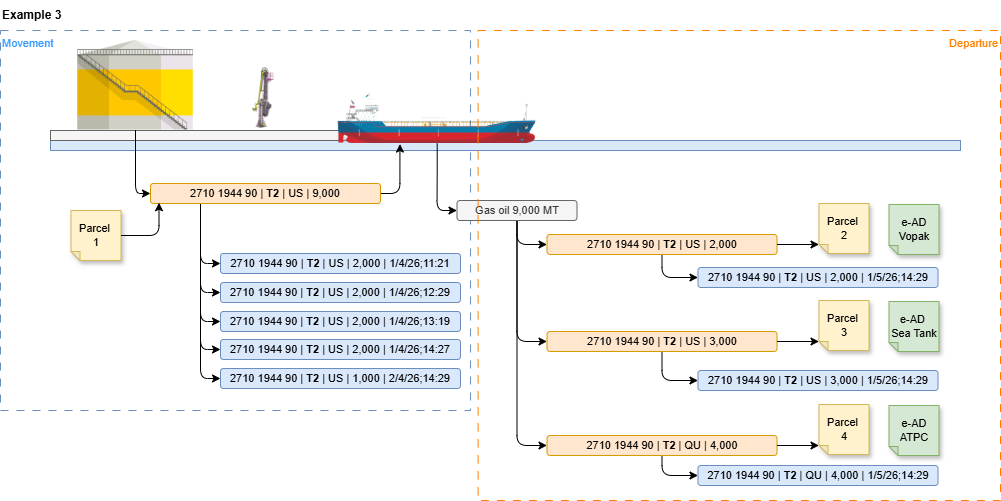
The Parcel is defined when Products are registered by the User as these are carried by the Means of Transport including administrative characteristics such as Commodity code, customs status, origin, cargo documents, consignee, etc.
Parcel Administration During Product Movements
For product handling, the creation and movement of Parcels is driven by the physical product being processed and its customs status. In these scenarios, the IT system determines the Parcels based on the administrative composition of the stock being moved.
For example, a Vessel or a tank containing 7,000 MT of gasoil may consist of 3,000 MT with T1 customs status and 4,000 MT with T2 customs status. When more than 4,000 MT is moved, the operation results in the movement of two separate Parcels, reflecting the two different customs statuses.
Where a Parcel contains multiple underlying SKUs, such as SKUs with different origins, the associated SKUs follow the Parcel movement according to the First In, First Out (FIFO) allocation methodology. As a result, the Parcel defines the administrative movement of the product, while the SKUs are allocated within that Parcel in FIFO order to maintain accurate inventory records and traceability.
The administration of Parcels for liquid bulk operations requires a dynamic approach because the physical quantity moved during an operation is not known until the operation has been completed. At the same time, customs legislation requires that goods are declared and presented before the operation takes place, as subsequent blending or commingling may make it impossible to distinguish the originally declared goods.
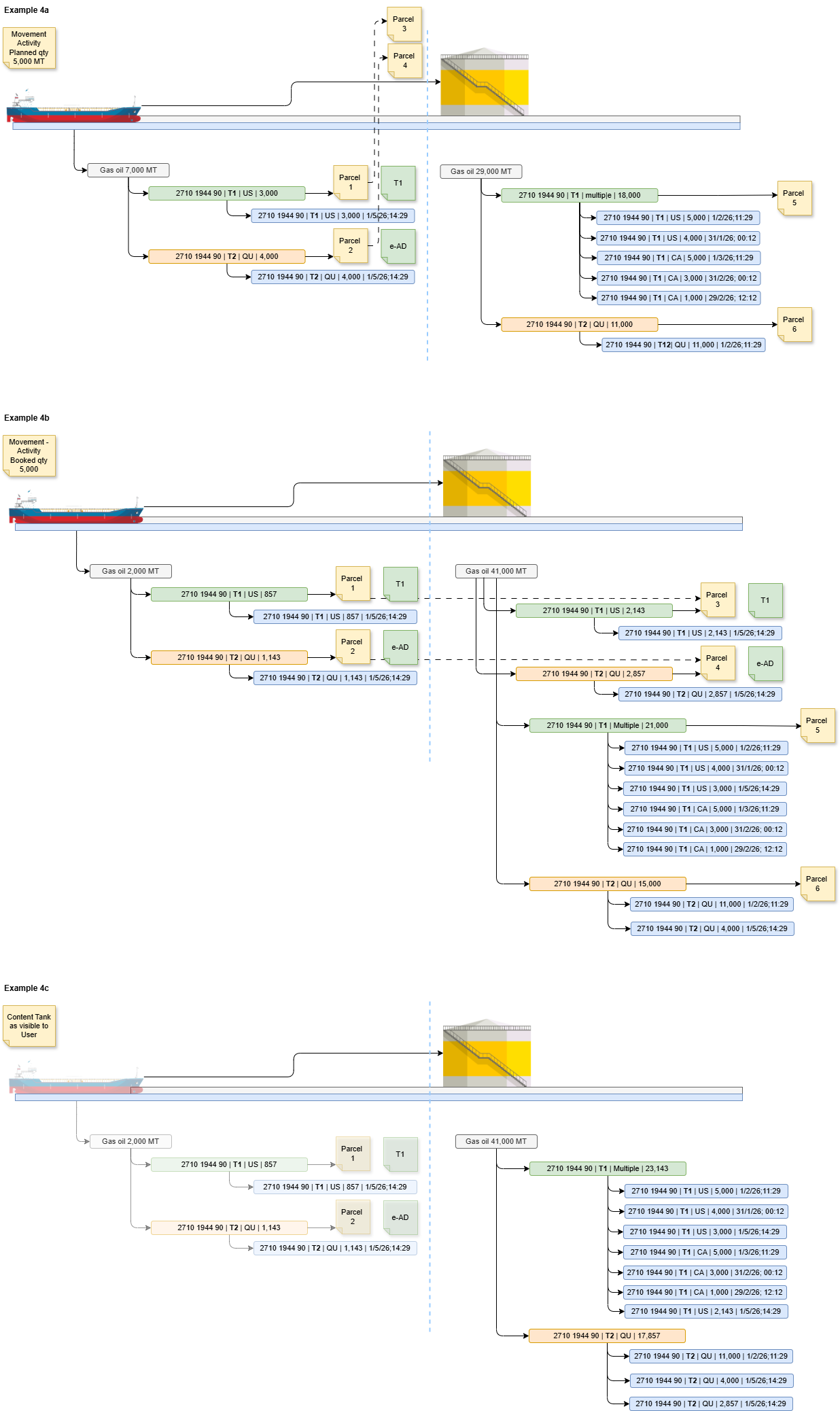
Parcel and SKU Allocation During Product Movements
Once Product has been booked into a Storage Unit, it may consist of multiple Parcels. For operational purposes, the User views the available physical Product by customs status. When a subsequent movement is planned, physical Product is allocated based on customs status, determining whether the movement involves one or multiple Parcels.
Each selected Parcel is linked to one or more SKUs that meet the applicable customs status and FIFO criteria, unless a preference is indicated on the basis of, for example, origin. The newly created Parcel or Parcels resulting from the movement maintain a relationship with the originating Parcels and the underlying SKUs from which they are derived.
This relationship can be established in two ways:
By selecting the originating Parcel or Parcels based on customs status and FIFO rules, after which the underlying SKUs are allocated accordingly; or
By allocating SKUs directly based on the planned quantity, customs status, and FIFO criteria, after which the corresponding Parcel relationships are derived from the selected SKUs.
As Parcels are composed of SKUs, both approaches result in the same traceability between the new Parcel(s), the originating Parcel(s), and the underlying inventory records.
Customs Procedure Traceability
Where a Parcel has been placed under a customs procedure, the underlying SKUs comprising that Parcel are considered to be under the same customs procedure. Conversely, where SKUs are identified as being under a customs procedure, this status can be attributed to the Parcel to which those SKUs belong.
For the purpose of determining whether a Product has already been declared for a specific customs procedure, traceability may be maintained in two ways:
Through the SKUs, which maintain the relationship to the originating and subsequent Parcels; or
Through the Parcels, which maintain the relationship to the underlying SKUs.
As the relationship between Parcels and SKUs is preserved throughout the allocation process, both approaches provide a valid mechanism for determining whether Product is already covered by a particular customs procedure and therefore whether additional customs declarations are required.
Initial Parcel determination
Prior to the start of a movement, the IT system determines the Product and the corresponding Parcel or Parcels based on the planned quantity. The determination is performed using the inventory position as it exists immediately before the operation commences.
At this point, the system queries the record keeping to identify all relevant Parcels and their administrative characteristics, including customs status. Based on this assessment, the required customs declarations can be prepared and lodged before the physical movement starts.
The quantity used during this initial assessment is an estimated or planned quantity. The actual transferred quantity cannot yet be established.
Determination of the actual quantity
In liquid bulk operations, the actual moved quantity is established only after completion of the physical operation. The quantity may be determined through:
- Tank measurements before and after the operation;
- Flow meter readings; or
- Weighbridge measurements.
Only after these measurements have been completed can the definitive quantity of Product and the corresponding Parcel allocation be determined.
Retrospective Parcel validation (final booking)
Once the actual moved quantity is known, the IT system performs a retrospective validation of the Parcel administration. This validation reassesses which Parcels should have been moved based on the inventory situation that existed immediately before the operation started, rather than the inventory situation at the time the reassessment is executed.
This temporal consistency is essential because customs declarations are based on the goods that were presented immediately prior to the operation. Consequently, the reassessment must use the same point-in-time inventory snapshot as the initial determination.
In practice, the Product already present in the receiving tank is treated as a fixed condition that existed before the movement and therefore remains unchanged for purposes of the reassessment.
Once the moved quantity has been measured, the final quantity is established and the circumstances of the Activity are reassessed retrospectively based on the situation as it existed at the start of execution.
When a Movement is executed, all Parcels and the associated SKUs involved in the operation are communicated to CMS. This includes the Product to be moved from the source Storage Unit, the Product already present in the receiving Storage Unit, and, where applicable, any additional Product simultaneously moving towards the same destination Storage Unit at the start of the Movement (referred to as Related Activity).
For each Movement, the exact composition of Parcels involved can only be determined with full certainty at the moment of final booking, when all actual figures have been established. The final booking is therefore only executed once the Movement have been completed and fully registered.
At that point, the definitive Parcel and SKU allocation is confirmed and recorded in CMS based on the validated operational outcome.
Related Activities are concurrent operations moving Product to the same destination Storage Unit at the start of a Movement and must be included in the Movement’s CMS communication and booking scope.
Parcel identity and corrections
Each Parcel must have a unique reference that identifies the represented Product and its associated customs status. This unique reference should remain unchanged between the initial assessment before the operation and the retrospective validation after completion.
In most cases, the retrospective validation will confirm the initial Parcel determination, with only the moved quantity requiring adjustment. In exceptional circumstances, however, the final measured quantity may lead to a different Parcel composition than originally anticipated. For example, an operation initially expected to involve a single Parcel may ultimately require two Parcels because the final quantity spans different customs status boundaries, or vice versa. As a result, customs declarations may in some cases not be lodged prior to the start of the operation, or may in hindsight have been created when they were not required.
In such cases, the IT system must correct the Parcel administration and any associated customs declarations while preserving the original assessment timestamp representing the moment immediately before the operation commenced. This ensures both an accurate inventory administration and a legally consistent customs audit trail.
Customs compliance risk is controlled at Product entry (license validation), while operational accuracy is ensured retrospectively through measured quantities and Parcel reconciliation.
In the near future it is expected that declarations for certain Products must be declared real-time via the Normal procedure instead of by means of Entry Into the Declarants Record (EIDR). In that case correction will be more cumbersome!
Customs Procedure Continuity and Accountability
The system must be capable of identifying the moment Product is first received and accountability is assumed. At the same time, each Parcel must always be recorded as being placed under a customs procedure or process.
The customs administration follows a chain-of-custody principle. Upon receipt, Product is received from a previous customs procedure or process that was under the responsibility of a third party. Once accountability is assumed, the Parcel is registered under the applicable customs procedure or process within the operator's responsibility.
For every planned Activity, an assessment is performed to determine the applicable license, customs procedure, or customs process. Upon execution of the Activity, the relevant Parcel is registered as having been placed under that customs procedure or process.
To support this, the system maintains a historical record of Parcel and SKU customs procedure assignments. Whenever a new Activity is assessed, this record is consulted to determine the previous customs procedure associated with the Parcel and its underlying SKUs. By maintaining this chain of registrations, the system can identify whether accountability for the Product has already been assumed or whether the Product represents a first-time arrival into the operator's responsibility.
Each Parcel must always have a traceable predecessor and successor customs procedure, enabling continuous accountability tracking from first receipt through all subsequent Activities.
Compliance management
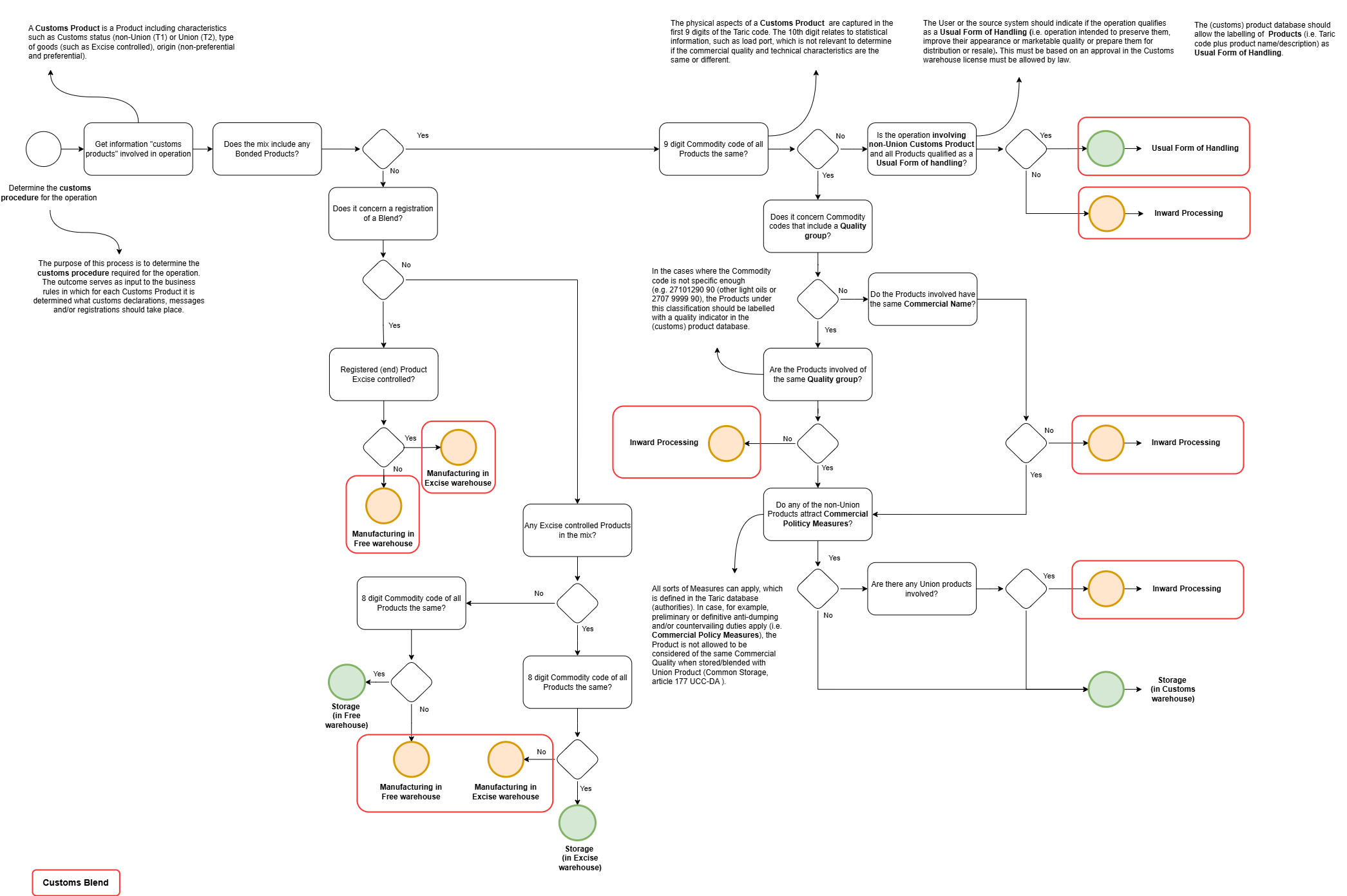
Customs Procedure Operation
Business rules
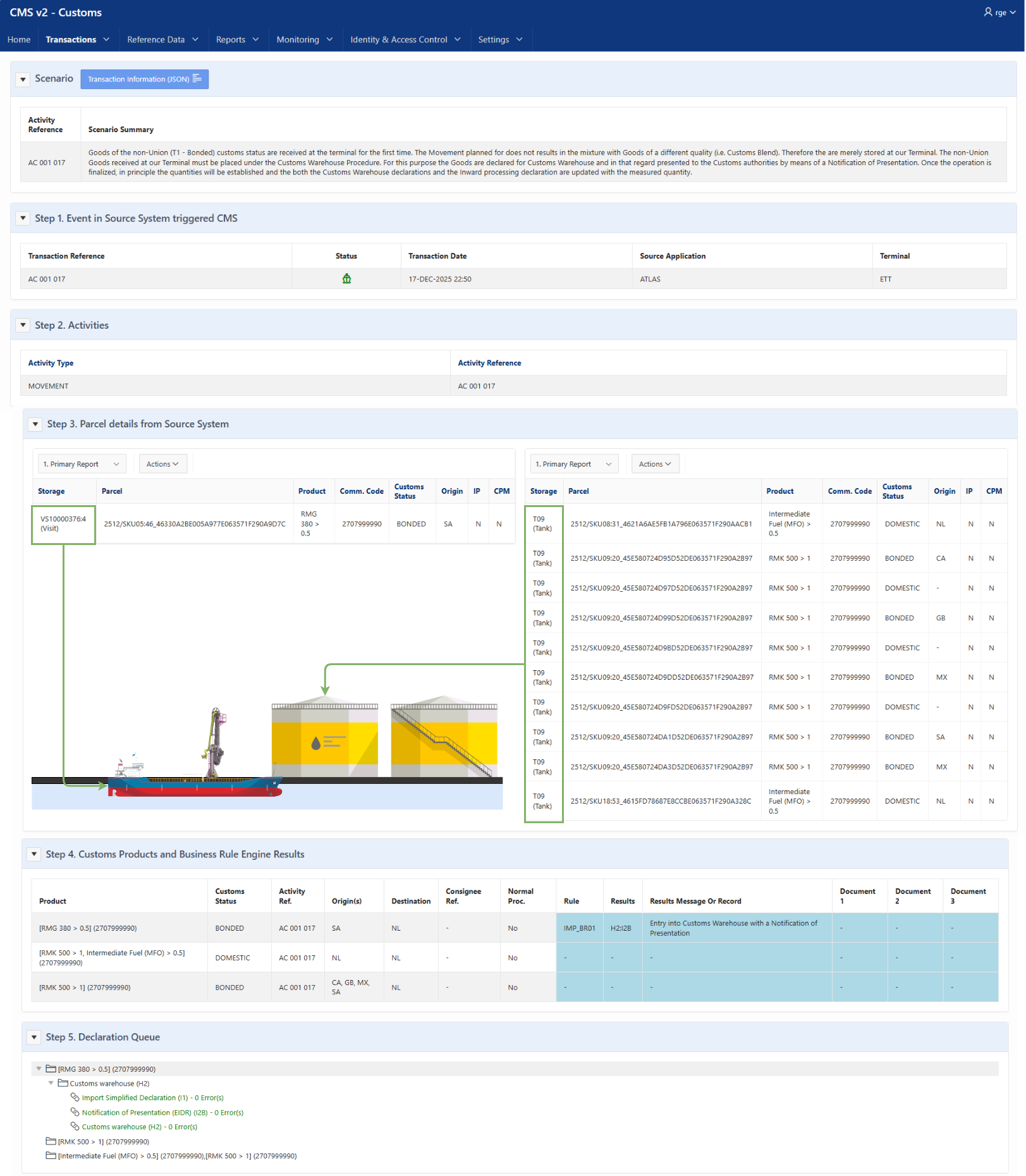
Business rules
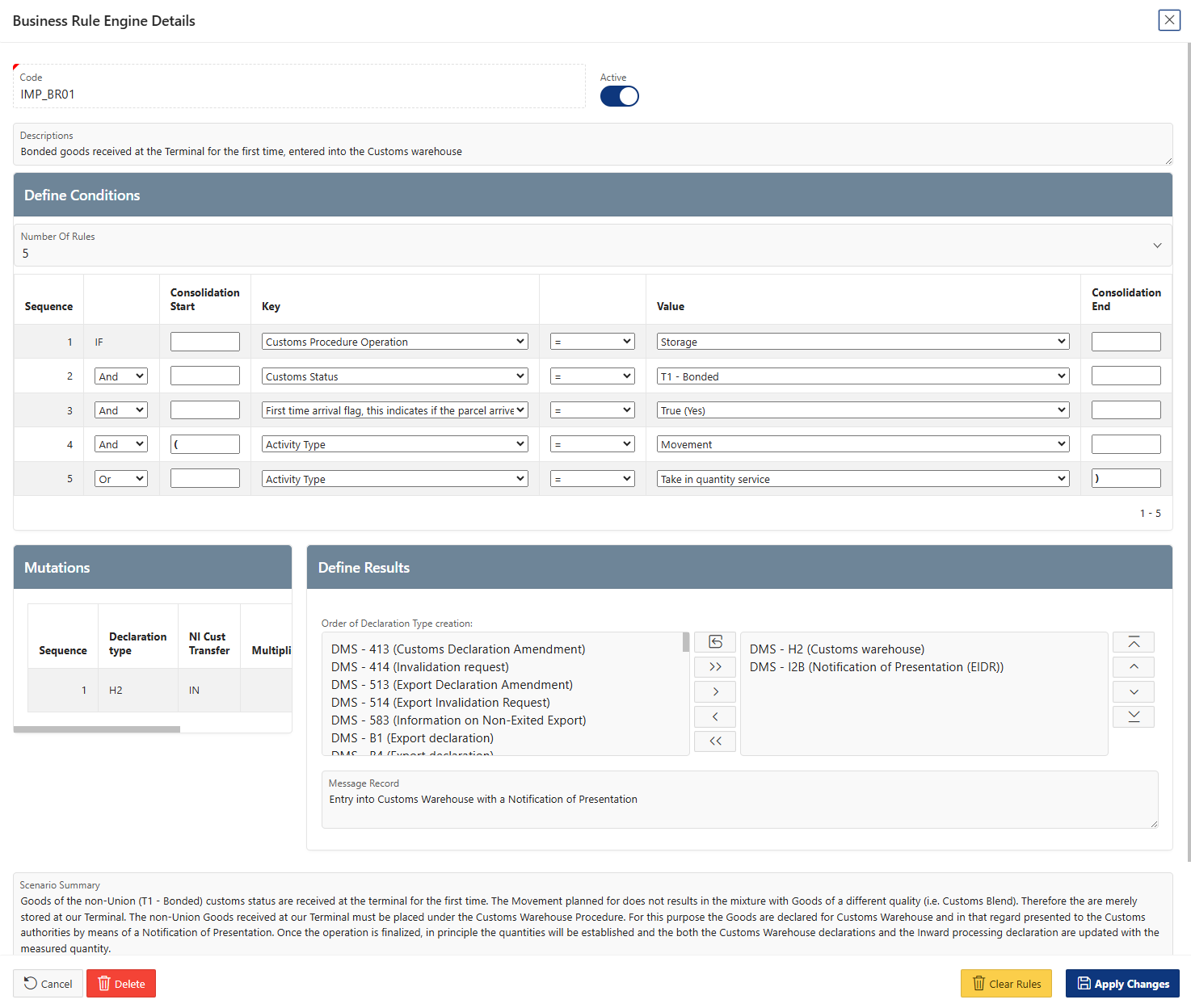
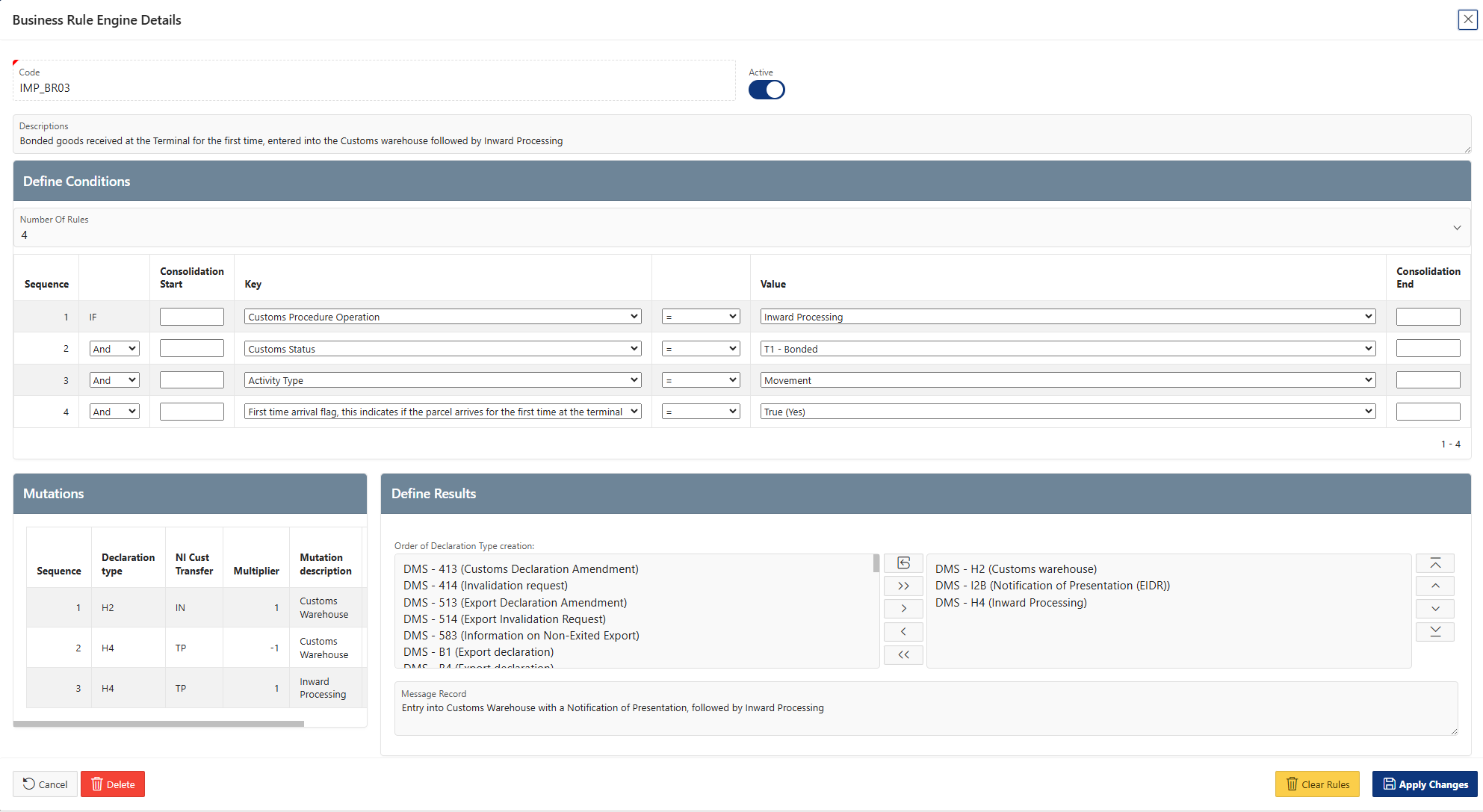
- The first condition relates to the assessment of the Customs procedure for the operation. In this example, all Parcels are of the same Commodity code AND have the same Quality group "High aromatic oils" not Bonded Product subject to CPM. Hence, the result for the Customs Procedure Operation is Storage;
- The Product declared is of the T1 - Bonded Customs status;
- It is the first time the product on board of the Vessel arrives at the Terminal. This is recognized by the System on the basis of the Parcel not having a Parent reference. In case a parcel has a Parent reference, that means the Parcel comes from another Parcel we have registered before and hence, it is not the first time arrival;
- The Activity type is a Movement.
Customs declarations or records
- Export declarations (B1 and B4). These are done via the normal procedure; and
- In case preferred or required by law the Import declaration (H1).
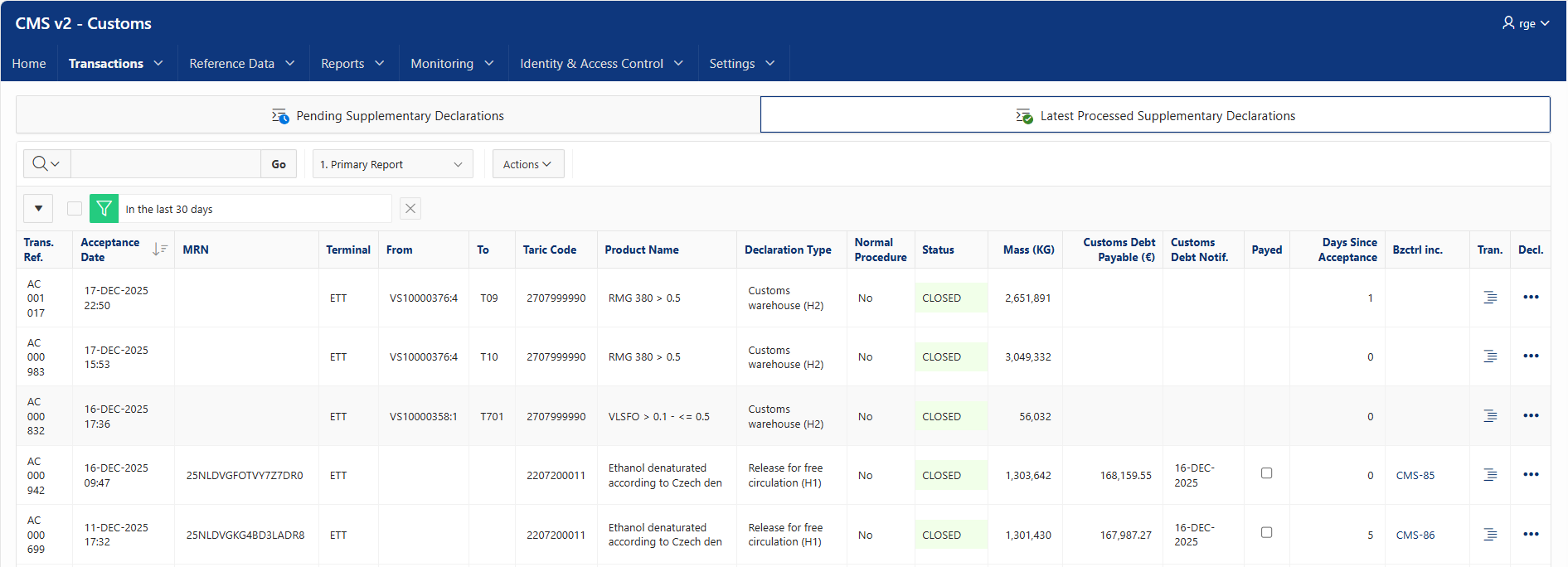

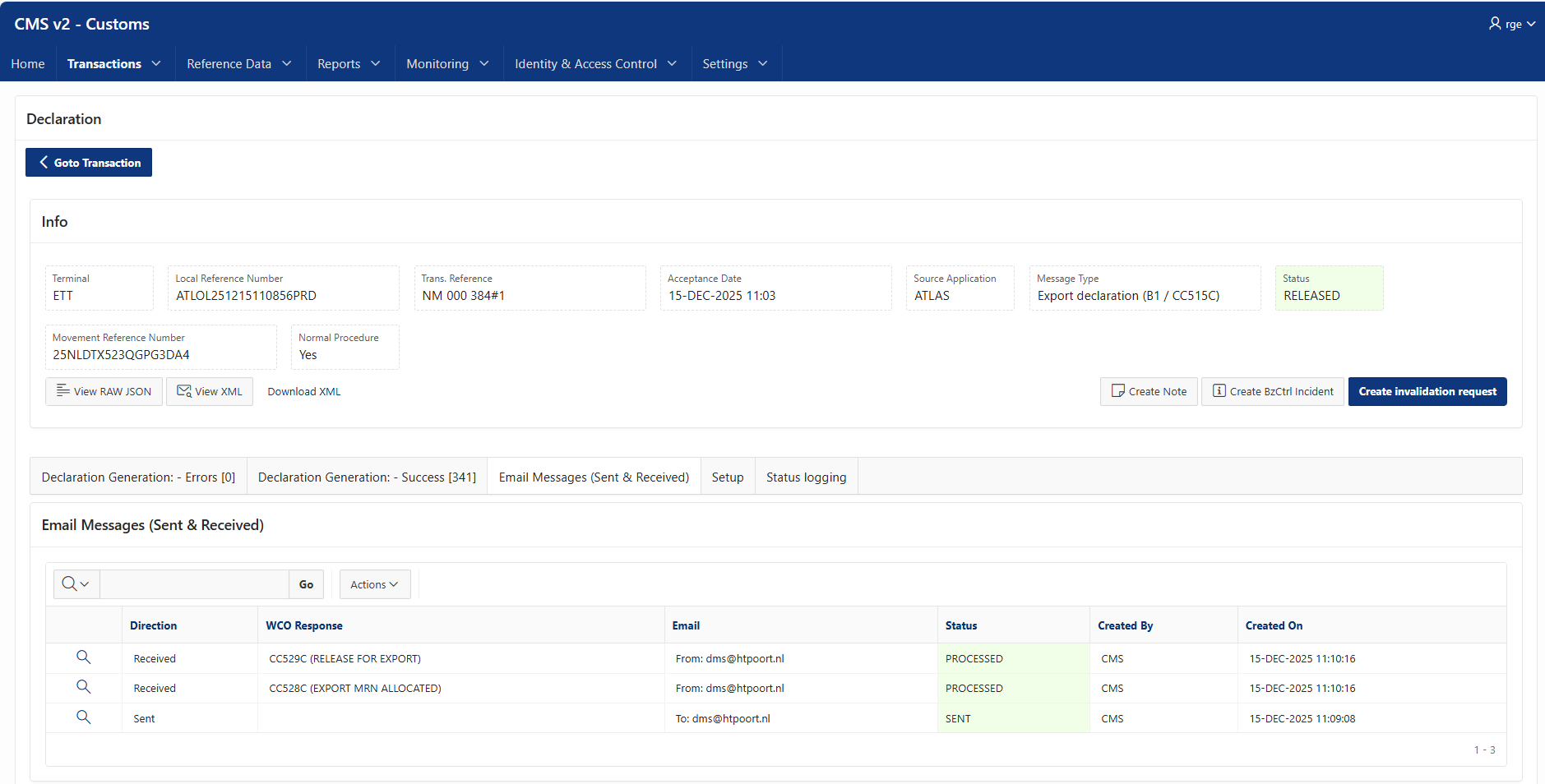
- Input from the User on the basis of information received from the Customer via the Nomination. Such as the Product and its Commodity Code, the Customs status, the origin, the customs value, etc.;
- The application of business rules. For example, in case of a Release for Free Circulation the procedure codes are determined on the basis of certain parameters. Below we have included an example where the Current Procedure Code is dictated by the fact that it concerns Excise controlled goods and the Previous Customs Code is based on the fact that it concerns goods coming from IP.

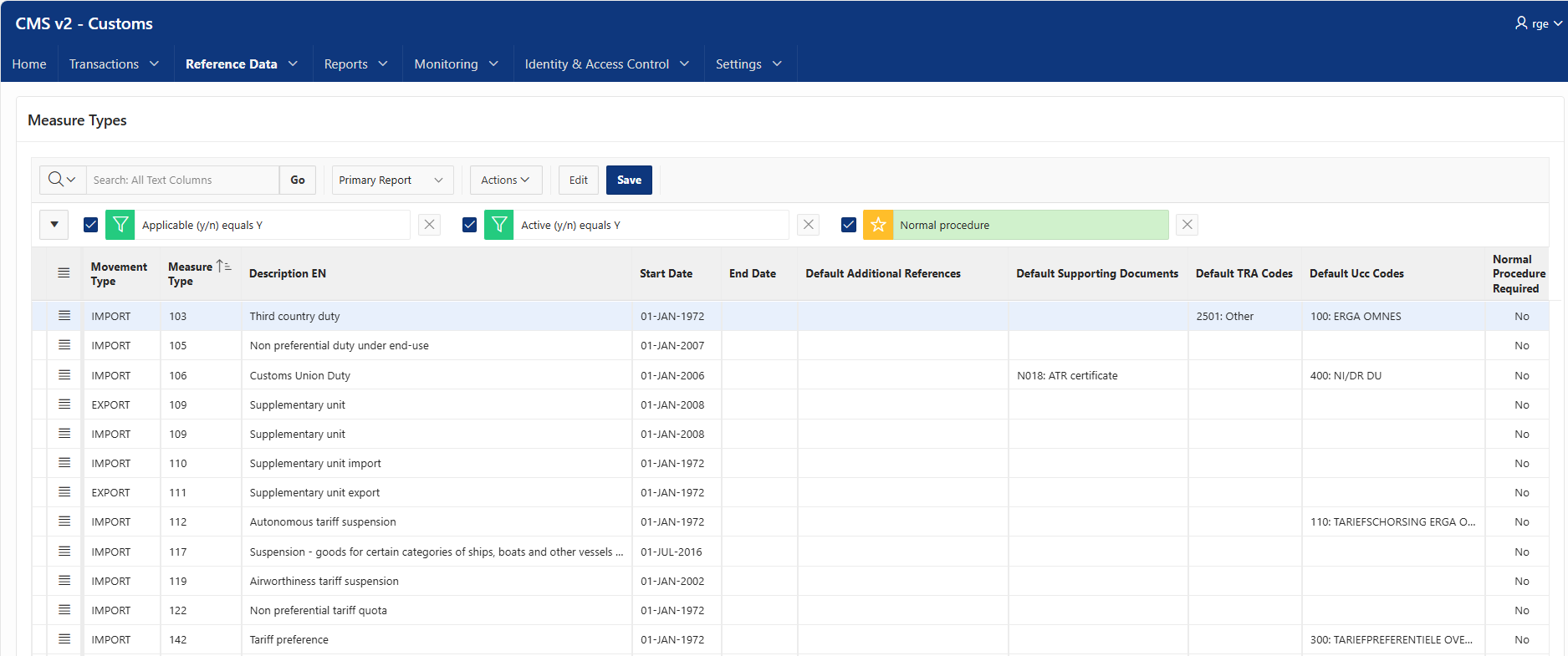
- Defaults for Measure Types. Below some examples of default values for Measure Types, used in the event such Measure Type is applicable for the product declared.
Reporting
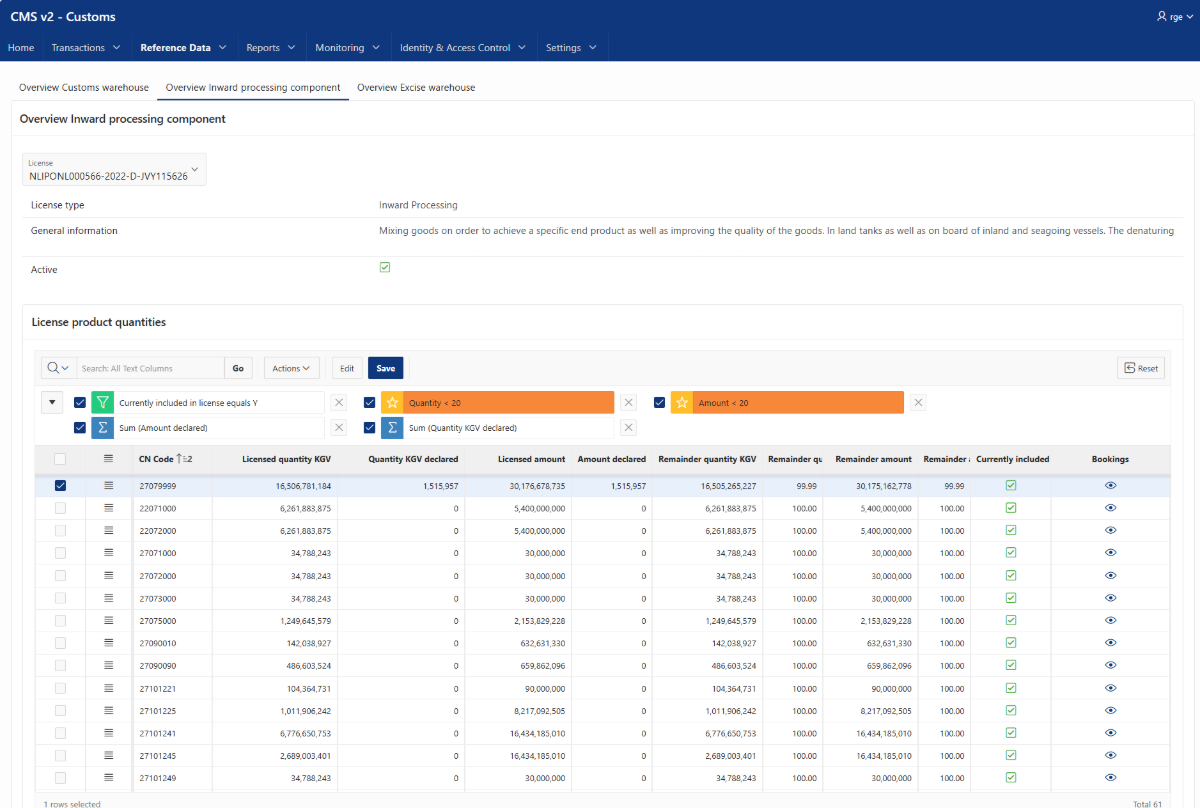
Monitoring licenses

Bill of Discharge

Detailed Stock Management


Audit file


Technical specifications
Process overview
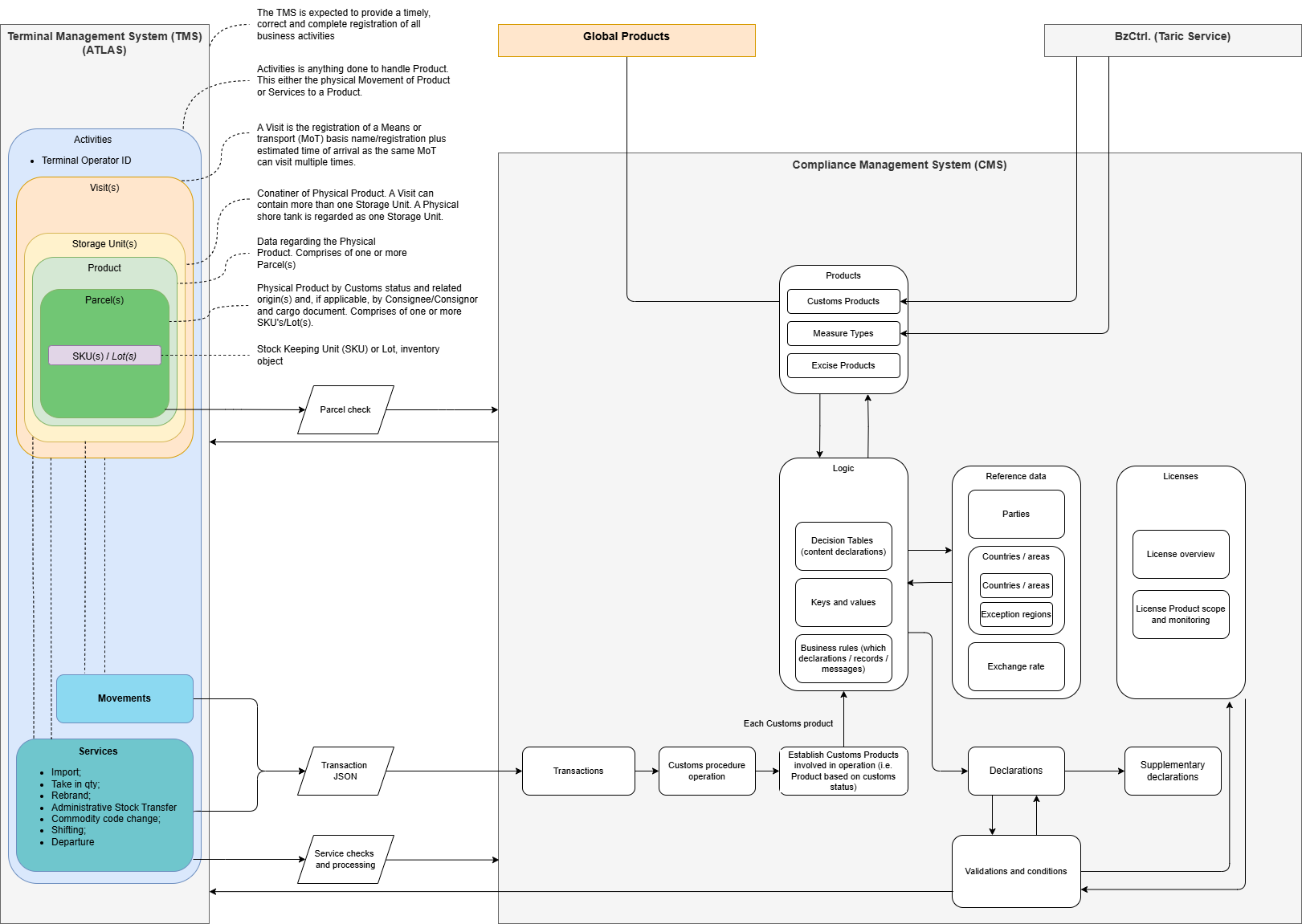
Transaction JSON
Transaction JSON Description
The Transaction JSON is the standardized interface used by the source system to communicate business and operational data to the customs management system. It contains all relevant information relating to a logistics activity, such as the movement of goods, transport details, involved parties, storage locations, and the products or parcels that are part of the transaction.
The information contained in the Transaction JSON serves as the primary input for the creation of customs declarations and other compliance-related processes. Each message must accurately represent the underlying business transaction and include all data required to determine the correct customs treatment of the goods.
The quality, completeness, and timeliness of the data provided are critical. Incorrect, incomplete, or delayed information may result in inaccurate customs declarations, non-compliance with customs legislation, delays in the supply chain, financial penalties, or increased audit risks.
It is therefore the responsibility of the source system and the data provider to ensure that:
- all mandatory data elements are populated correctly;
- the information reflects the actual business transaction and physical movement of the goods;
- product and parcel details, including commodity classifications, origin, quantities, and supporting documents, are accurate and up to date;
- changes affecting the transaction are communicated promptly to the customs management system.
By providing reliable and timely Transaction JSON messages, organizations can support compliant customs processes, minimize operational risks, and ensure efficient processing of import, export, transit, and storage activities.
1. Transaction Header
| JSON Path | Business Name | Description | Mandatory | Allowed Values | Example |
|---|---|---|---|---|---|
| sourceApplication | Source System | Unique identifier of the source application | Yes | ATLAS, CTA | ATLAS |
| terminal | Terminal | Unique identifier of the terminal | Yes | - | ETT |
| reference | Movement Reference | Unique local reference for the declaration request | Yes | - | PR_ACTI_AC10007466 |
| displayReference | Display Reference | Display value of the reference | No | - | AC 007 466 |
| taxCountry | Customs Country | Country where tax is due | Yes | CMS Country Codes | NL |
| cmsReference | CMS Reference | Reference to an existing CMS transaction | Conditional | - | UUID |
| overrideCheckAlert | Override Indicator | Override validation warnings | No | Y, N | N |
| userId | User ID | User invoking the transaction service | No | - | USER001 |
| presentationDateTime | Presentation Date Time | Transaction timestamp in UTC | Yes | ISO-8601 | 2026-05-30T20:59:17Z |
| normalProcedure | Normal Procedure | Apply Normal Customs Procedure | No | Y, N | N |
2. Customs Product
customsProduct.customsValue.invoice
| JSON Path | Description | Mandatory |
|---|---|---|
| reference | Invoice reference | Conditional |
| amount | Invoice value | Conditional |
| currency | Invoice currency | Conditional |
| incotermCode | Applicable Incoterm | Conditional |
| elementsToInclude.freightCostsAmount | Freight costs | Conditional |
| elementsToInclude.insuranceCostsAmount | Insurance costs | Conditional |
Allowed Incoterms
| Value |
|---|
| CIF |
| FOB |
Allowed Currencies
| Value |
|---|
| USD |
| EUR |
customsProduct.customsValue.marketValue
| JSON Path | Description |
|---|---|
| amount | Market value of goods |
| currency | Currency |
customsProduct.commodity
| JSON Path | Description |
|---|---|
| code | 10-digit TARIC code |
| description | Commercial product description |
| reference | External product reference |
3. Activities
| JSON Path | Description | Mandatory |
|---|---|---|
| activities.reference | Activity reference | Yes |
| activities.displayReference | Display reference | No |
| activities.activityType | Activity type | Yes |
| activities.serviceType | Service type | Conditional |
| activities.nominationReference | Nomination reference | Conditional |
| activities.relatedReference | Related activity reference | Conditional |
| activities.executedByExternalCustomsBroker | External broker indicator | No |
Activity Types
| Allowed Values |
|---|
| MOVEMENT |
| SERVICE |
Service Types
| Allowed Values |
|---|
| IMPORT |
| REBRAND |
| RENAME |
| DEPARTURE |
| ADMINISTRATIVE_STOCK_TRANSFER |
| TAKE_IN |
| SHIFTING |
| COMMODITY_CODE_CORRECTION |
4. Medium
| JSON Path | Description |
|---|---|
| medium.type | Source / destination side of activity |
Allowed Values
| Value | Meaning |
|---|---|
| FROM_STORAGE_UNIT | Source storage location |
| TO_STORAGE_UNIT | Destination storage location |
| IN_STORAGE_UNIT | Activity within same storage unit |
5. Storage Unit
| JSON Path | Description |
|---|---|
| storageUnit.storageUnitReference | Storage Unit Identifier |
6. Visit Information
| JSON Path | Description |
|---|---|
| visit.visitReference | Visit identifier |
| visit.transportMeansReference | Vessel name / Truck registration |
| visit.transportMeansTypeCode | Transport means type |
| visit.transportMeansNationalityCode | Nationality of transport means |
| visit.changedTransportArrangement | Changed arrangement indicator |
Transport Means Types
| Value |
|---|
| RA |
| RO |
| VES |
| BAR |
| PI |
| TANK |
7. Tank Information
| JSON Path | Description |
|---|---|
| tank.tankName | Tank name |
8. Parcel Information
| JSON Path | Description |
|---|---|
| parcels.reference | Unique parcel identifier |
| parcels.parentReference | Parent parcel |
| parcels.firstTimeArrival | First arrival under license |
| parcels.inwardProcessingFlag | Subject to inward processing |
| parcels.commercialPolicyMeasureFlag | Commercial Policy Measures applicable |
| parcels.exceptionDocument | Exception document |
| customsStatus | Customs status |
| unNumber | Dangerous Goods UN number |
Flag Values
| Value |
|---|
| Y |
| N |
Customs Status Values
| Value |
|---|
| BONDED |
| EXCISE |
| DOMESTIC |
9. Parties
Customer
| JSON Path |
|---|
| parties.customer.reference |
| parties.customer.name |
| parties.customer.language |
| parties.customer.eori |
| parties.customer.vatNumber |
| parties.customer.cbsCode |
| parties.customer.address.streetName |
| parties.customer.address.houseNumber |
| parties.customer.address.postalCode |
| parties.customer.address.cityName |
| parties.customer.address.countryCode |
Consignee
| JSON Path |
|---|
| parties.consignee.reference |
| parties.consignee.name |
| parties.consignee.language |
| parties.consignee.eori |
| parties.consignee.exciseNumber |
| parties.consignee.registeredConsigneeFlag |
| parties.consignee.monthlyStatementApproval |
| parties.consignee.cbsCode |
| parties.consignee.address.* |
Consignor
| JSON Path |
|---|
| parties.consignor.reference |
| parties.consignor.name |
| parties.consignor.language |
| parties.consignor.eori |
| parties.consignor.exciseNumber |
| parties.consignor.cbsCode |
| parties.consignor.address.* |
Place Of Dispatch Trader
| JSON Path |
|---|
| parties.placeOfDispatchTrader.reference |
| parties.placeOfDispatchTrader.name |
| parties.placeOfDispatchTrader.language |
| parties.placeOfDispatchTrader.eori |
| parties.placeOfDispatchTrader.referenceOfTaxWarehouse |
| parties.placeOfDispatchTrader.locationName |
| parties.placeOfDispatchTrader.cbsCode |
| parties.placeOfDispatchTrader.address.* |
Delivery Place Trader
| JSON Path |
|---|
| parties.deliveryPlaceTrader.reference |
| parties.deliveryPlaceTrader.name |
| parties.deliveryPlaceTrader.language |
| parties.deliveryPlaceTrader.eori |
| parties.deliveryPlaceTrader.referenceOfTaxWarehouse |
| parties.deliveryPlaceTrader.locationName |
| parties.deliveryPlaceTrader.cbsCode |
| parties.deliveryPlaceTrader.address.* |
Exporter
| JSON Path |
|---|
| parties.exporter.reference |
| parties.exporter.name |
| parties.exporter.language |
| parties.exporter.eori |
| parties.exporter.cbsCode |
| parties.exporter.address.* |
Seller
| JSON Path |
|---|
| parties.seller.reference |
| parties.seller.name |
| parties.seller.language |
| parties.seller.eori |
| parties.seller.cbsCode |
| parties.seller.address.* |
10. Goods Location
| JSON Path | Description |
|---|---|
| location.language | Location language |
| location.address.streetName | Street |
| location.address.houseNumber | House number |
| location.address.postalCode | Postal code |
| location.address.cityName | City |
| location.address.countryCode | Country |
| location.cbsCode | CBS code |
| location.locationName | Location name |
11. Country Information
| JSON Path | Description |
|---|---|
| destinationCountryCode | Destination country |
| dispatchCountryCode | Dispatch country |
Exit Office
| JSON Path | Description |
|---|---|
| exitOffice.reference | CMS reference |
| exitOffice.name | Exit office name |
| exitOffice.id | Customs office code (CL294) |
Origin
| JSON Path | Description |
|---|---|
| origin.type | Origin type |
| origin.countryCode | Origin country |
Origin Types
| Value |
|---|
| PREFERENTIAL |
| NON-PREFERENTIAL |
12. Commodity
| JSON Path | Description |
|---|---|
| commodity.code | 10-digit TARIC code |
| commodity.description | Commercial description |
| commodity.reference | Product reference |
13. Cargo Documents
| JSON Path | Description |
|---|---|
| cargoDocuments.type | Document type |
| cargoDocuments.reference | Document reference |
Supported Document Types
| Value |
|---|
| MANIFEST_INFO |
| B_L |
| AGRIM |
| AT_R |
| EUR_1 |
| EUR_MED |
| INVOICE |
| ORIG_DECL |
| INF3 |
| STAT_ON_ORIG |
| T2L_F |
| T2L |
| E_AD |
| T1 |
| T2 |
| EVIDENCE |
14. Quantities
| JSON Path | Description |
|---|---|
| quantities.type | PLANNED or ACTUAL |
| quantities.kgv | Kilograms in vacuum |
| quantities.kga | Kilograms in air |
| quantities.gmv | Kilograms in vacuum (decimal) |
| quantities.gma | Kilograms in air (decimal) |
| quantities.l15 | Litres at 15°C |
| quantities.l20 | Litres at 20°C |
| quantities.ml5 | Litres (decimal precision) |
| quantities.alcPerc | Alcohol percentage |
Quantity Types
| Value |
|---|
| PLANNED |
| ACTUAL |
15. Density
| JSON Path | Description |
|---|---|
| density.value | Density value |
| density.uom | Density reference basis |
Density UOM
| Value |
|---|
| D15 |
| D1A |
16. Compliance-Critical Fields
| Field | Compliance Impact |
|---|---|
| commodity.code | Duty determination, restrictions and TARIC measures |
| customsStatus | Customs treatment |
| destinationCountryCode | Declaration routing and reporting |
| dispatchCountryCode | Origin and trade statistics |
| origin.countryCode | Preference and duty calculation |
| customsValue | Customs valuation |
| parties.customer.eori | Legal declarant identification |
| cargoDocuments | Supporting evidence |
| quantities.* | Tax and customs calculations |
| firstTimeArrival | Import declaration treatment |
| inwardProcessingFlag | Special procedure determination |
Structure Transaction JSON
This is the consolidated hierarchy using the CMS schema as the authoritative source and includes both the transaction-level customsProduct and the parcel-level customs/commodity structures.
Back up, documentation Confluence
Customs procedure Operation
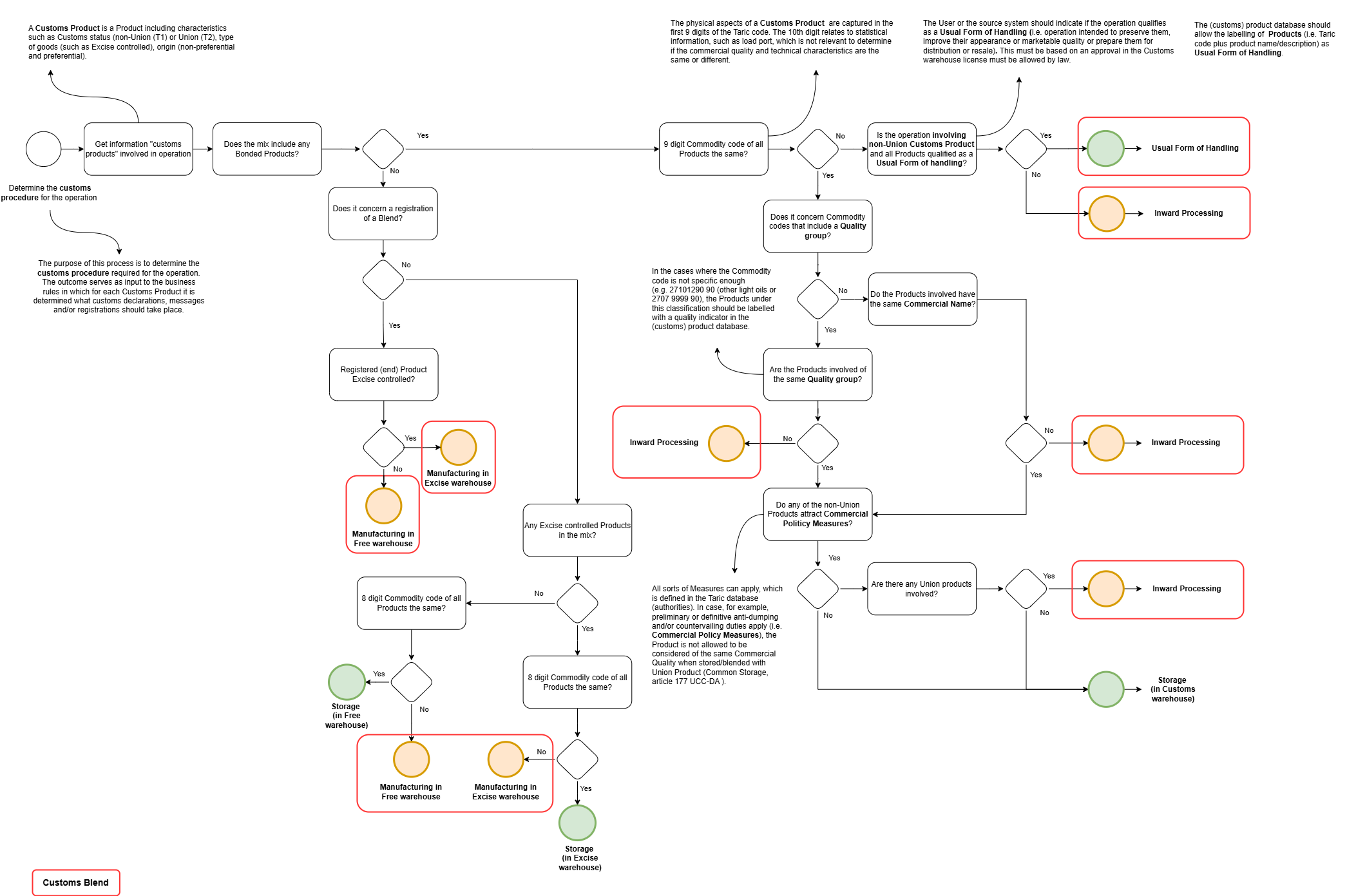
Business rules overview CMS
| Rule Code | Rule Type | Description | Result | Result Message / Record | Closing record | Scenario summary | Conditions |
| EXP_BR01 | EXPORT | BR01 - AAD - Excise controlled goods to non EU | IE815:B1 | B1 - Export | Goods of the Union (T2) customs status are loaded for a destination outside the EU. These goods are excise controlled based on their nature. Therefore, we are required as a Tax warehouse authorisation holder, to issue an e-AD with the destination the Customs office of export to ensure excise duties remain suspended. From a customs perspective, the fact that the goods will leave the EU requires an Export declaration. The e-AD (excise regime) is discharged by the Export declaration (customs regime). The Export declaration (customs regime) requires a confirmation of exit for the goods to discharge us, as consignor, from any responsibilities related to excise and customs duties. The Export declaration is the document that will physically accompany the goods. | • IF PARCEL_CUSTOMS_STATUS =
EXCISE_CONTROLLED • And CUSTOMS_PROCEDURE_MOVEMENT = EXPORT • And CU_BUSINESS_ENGINE.FN_IN_DESTINATION_EU = N • And CU_BUSINESS_ENGINE.FN_IN_DESTINATION_EFTA = N • And CU_BUSINESS_ENGINE.FN_IN_COUNTRY_EXPORT_CROSSING_EU_TERRITORY = N • And CU_BUSINESS_ENGINE.FN_IN_EXCEPTION_CUSTOMS_UNION = N • And MONTHLY_STATEMENT_APPROVAL = N |
|
| EXP_BR02 | EXPORT | BR02 - AAD - Excise controlled goods to EFTA+ | IE815:B1 | B1 - Export | Goods of the Union (T2) customs status are loaded for a destination outside the EU. These goods are excise controlled based on their nature. Therefore, we are required as a Tax warehouse authorisation holder, to issue an e-AD with the destination the Customs office of export to ensure excise duties remain suspended. From a customs perspective, the fact that the goods will leave the EU requires an Export declaration. The e-AD (excise regime) is discharged by the Export declaration (customs regime). The Export declaration (customs regime) requires a confirmation of exit for the goods to discharge us, as consignor, from any responsibilities related to excise and customs duties. The country of destination is a country that entered into a special agreement with the EU allowing simplifications, such as using a transit procedure. But because geographically the country of destination is only accesible through international waters, a transit procedure (T document) can not be applied. Therefore, the Export declaration is the document that will physically accompany the goods. | • IF PARCEL_CUSTOMS_STATUS =
EXCISE_CONTROLLED • And CUSTOMS_PROCEDURE_MOVEMENT = EXPORT • And CU_BUSINESS_ENGINE.FN_IN_DESTINATION_EU = N • And CU_BUSINESS_ENGINE.FN_IN_DESTINATION_EFTA = Y • And CU_BUSINESS_ENGINE.FN_IN_COUNTRY_EXPORT_CROSSING_EU_TERRITORY = N • And CU_BUSINESS_ENGINE.FN_IN_EXCEPTION_CUSTOMS_UNION = N • And MONTHLY_STATEMENT_APPROVAL = N |
|
| EXP_BR03 | EXPORT | BR03 - AAD - Excise controlled goods to EFTA+ crossing EU | IE815:B1:IE015 | B1 - Export followed by Transit | Goods of the Union (T2) customs status are loaded for a destination outside the EU. These goods are excise controlled based on their nature. Therefore, we are required as a Tax warehouse authorisation holder, to issue an e-AD with the destination the Customs office of export to ensure excise duties remain suspended. From a customs perspective, the fact that the goods will leave the EU requires an Export declaration. The e-AD (excise regime) is discharged by the Export declaration (customs regime). The Export declaration (customs regime) is discharged by the Transit procedure. The country of destination is a country that entered into a special agreement with the EU, allowing simplifications. For that reason a Transit document (T2) is issued allowing the goods to enter the country without import formalities and directly go to its destination in the receiving country. The Transit document (T2) is the document that will physically accompany the goods. | • IF PARCEL_CUSTOMS_STATUS =
EXCISE_CONTROLLED • And CUSTOMS_PROCEDURE_MOVEMENT = EXPORT • And CU_BUSINESS_ENGINE.FN_IN_DESTINATION_EU = N • And CU_BUSINESS_ENGINE.FN_IN_DESTINATION_EFTA = Y • And CU_BUSINESS_ENGINE.FN_IN_COUNTRY_EXPORT_CROSSING_EU_TERRITORY = Y • And CU_BUSINESS_ENGINE.FN_IN_EXCEPTION_CUSTOMS_UNION = N • And MONTHLY_STATEMENT_APPROVAL = N |
|
| EXP_BR04 | EXPORT | BR04 - AAD - Excise Controlled goods to customs territory, not excise and VAT | IE815:B4 | B4 - Export to fiscal territory | Goods of the Union (T2) customs status are loaded for a destination country considered 'special territory'. This country is considered part of the Customs territory, but not that of Excise and VAT territory. So only from an Excise and VAT point of view the goods are exported requiring a special Export declaration referred to as B4 (CO). These goods are excise controlled based on their nature. Therefore, we are required as a Tax warehouse authorisation holder, to issue an e-AD with the destination the Customs office of export to ensure excise duties remain suspended. The e-AD (excise regime) is discharged by the Export declaration (customs regime). The Export declaration (customs regime) requires a confirmation of exit for the goods to discharge us, as consignor, from any responsibilities related to excise duties. To prove from a customs perspective that the goods are of the Union (T2) customs status, a T2LF documents is issued. The "F" means that the country of destination is not VAT territory. The Export declaration and the T2LF document are the documents that will physically accompany the goods. | • IF PARCEL_CUSTOMS_STATUS =
EXCISE_CONTROLLED • And CUSTOMS_PROCEDURE_MOVEMENT = EXPORT • And CU_BUSINESS_ENGINE.FN_IN_DESTINATION_EU = N • And CU_BUSINESS_ENGINE.FN_IN_DESTINATION_EFTA = N • And CU_BUSINESS_ENGINE.FN_IN_EXCEPTION_CUSTOMS_UNION = Y • And CU_BUSINESS_ENGINE.FN_IN_EXCEPTION_EXCISE_TERRITORY = N • And CU_BUSINESS_ENGINE.FN_IN_EXCEPTION_VAT_DIRECTIVE = N • And MONTHLY_STATEMENT_APPROVAL = N |
|
| EXP_BR05 | EXPORT | BR05 - AAD - Excise Controlled goods to customs and excise territory, not VAT | IE815:B4 | B4 - Export to fiscal territory | Goods of the Union (T2) customs status are loaded for a destination country considered 'special territory'. This country is considered part of the Customs and Excise territory, but not that of VAT territory. So only from a VAT point of view the goods are exported requiring a special Export declaration referred to as B4 (CO). These goods are excise controlled based on their nature. Therefore, we are required as a Tax warehouse authorisation holder, to issue an e-AD adressed to the consignee to ensure excise duties remain suspended. The Export declaration (customs regime) requires a confirmation of exit for the goods to discharge our Customer's responsibilities related to VAT. To prove from a customs perspective that the goods are of the Union (T2) customs status, a T2LF documents is issued. The "F" means that the country of destination is not VAT territory. The Export declaration and the T2LF document are the documents that will physically accompany the goods. | • IF PARCEL_CUSTOMS_STATUS =
EXCISE_CONTROLLED • And CUSTOMS_PROCEDURE_MOVEMENT = EXPORT • And CU_BUSINESS_ENGINE.FN_IN_DESTINATION_EU = N • And CU_BUSINESS_ENGINE.FN_IN_DESTINATION_EFTA = N • And CU_BUSINESS_ENGINE.FN_IN_EXCEPTION_CUSTOMS_UNION = Y • And CU_BUSINESS_ENGINE.FN_IN_EXCEPTION_EXCISE_TERRITORY = Y • And CU_BUSINESS_ENGINE.FN_IN_EXCEPTION_VAT_DIRECTIVE = N • And MONTHLY_STATEMENT_APPROVAL = N |
|
| EXP_BR06 | EXPORT | BR06 - AAD - Excise controlled goods to customs, VAT and excise territory | IE815 | EMCS | Goods of the Union (T2) customs status are loaded for a destination country considered 'special territory'. This country is considered part of the Customs, Excise, and VAT territory, but not of the EU territory. Hence, no export takes place from a customs, excise and VAT perspective and no Export declaration is required for this purpose. These goods are excise controlled based on their nature. Therefore, we are required as a Tax warehouse authorisation holder, to issue an e-AD adressed to the consignee to ensure excise duties remain suspended. To prove from a customs perspective that the goods are coming from the free circulation (Union (T2) customs status), a T2L documents is issued. The Export declaration and the T2L document are the documents that will physically accompany the goods. | • IF PARCEL_CUSTOMS_STATUS =
EXCISE_CONTROLLED • And CUSTOMS_PROCEDURE_MOVEMENT = EXPORT • And CU_BUSINESS_ENGINE.FN_IN_DESTINATION_EU = N • And CU_BUSINESS_ENGINE.FN_IN_DESTINATION_EFTA = N • And CU_BUSINESS_ENGINE.FN_IN_EXCEPTION_CUSTOMS_UNION = Y • And CU_BUSINESS_ENGINE.FN_IN_EXCEPTION_EXCISE_TERRITORY = Y • And CU_BUSINESS_ENGINE.FN_IN_EXCEPTION_VAT_DIRECTIVE = Y • And MONTHLY_STATEMENT_APPROVAL = N |
|
| EXP_BR07 | EXPORT | BR07 - AAD - Excise controlled goods to EU | IE815 | EMCS | Goods of the Union (T2) customs status are loaded for a destination within the EU. These goods are excise controlled based on their nature. Therefore, we are required as a Tax warehouse authorisation holder, to issue an e-AD adressed to the consignee to ensure excise duties remain suspended. The goods are accompanied by an e-AD. | • IF PARCEL_CUSTOMS_STATUS =
EXCISE_CONTROLLED • And CU_BUSINESS_ENGINE.FN_IN_DESTINATION_EU = Y • And EXCEPTION_DOCUMENT != VAG • And MONTHLY_STATEMENT_APPROVAL = N |
|
| EXP_BR07A | EXPORT | BR07A - AAD - Excise controlled goods to EU, Monthly declaration (VAG) | Monthly declaration | Goods of the Union (T2) customs status are loaded for a destination within the Netherlands. These goods are excise controlled based on their nature. Therefore, we are required as a Tax warehouse authorisation holder, to apply a suspension procedure to ensure excise duties remain suspended. The main rule is that goods are accompanied by an e-AD, however, in this case both the Consignee and ourselves have an approval in our authorisation to make use of Monthly declarations (VAG). Therefore, in this case the goods do not have to be accompanied by an e-AD. The same applies when we move the goods between locations mentioned in our own license, such as Movement between our jetties and the Buoys for example. | • IF PARCEL_CUSTOMS_STATUS =
EXCISE_CONTROLLED • And CU_BUSINESS_ENGINE.FN_IN_DESTINATION_EU = Y • And EXCEPTION_DOCUMENT = VAG |
||
| EXP_BR08 | EXPORT | BR08 - FRE - Domestic goods to non EU | B1 | B1 - Export | Goods of the Union (T2) customs status are loaded for a destination outside the EU. These goods are NOT excise controlled (customs status FRE - Domestic). Therefore, no e-AD document is required as there are no excises applicable to suspend. From a customs perspective, the fact that the goods will leave the EU requires an Export declaration. The Export declaration requires a confirmation of exit for the goods to discharge us, as consignor, from any responsibilities related to customs duties. | • IF PARCEL_CUSTOMS_STATUS =
DOMESTIC • And CUSTOMS_PROCEDURE_MOVEMENT = EXPORT • And CU_BUSINESS_ENGINE.FN_IN_DESTINATION_EU = N • And CU_BUSINESS_ENGINE.FN_IN_DESTINATION_EFTA = N • And CU_BUSINESS_ENGINE.FN_IN_COUNTRY_EXPORT_CROSSING_EU_TERRITORY = N • And CU_BUSINESS_ENGINE.FN_IN_EXCEPTION_CUSTOMS_UNION = N • And MONTHLY_STATEMENT_APPROVAL = N |
|
| EXP_BR09 | EXPORT | BR09 - FRE - Domestic to EFTA+ | B1 | B1 - Export | Goods of the Union (T2) customs status are loaded for a destination outside the EU. These goods are NOT excise controlled (customs status FRE - Domestic). Therefore, no e-AD document is required as there are no excises applicable to suspend. From a customs perspective, the fact that the goods will leave the EU requires an Export declaration. The Export declaration requires a confirmation of exit for the goods to discharge us, as consignor, from any responsibilities related to customs duties. The country of destination is a country that entered into a special agreement with the EU allowing simplifications, such as using a transit procedure. But because geographically the country of destination is only accessible through international waters, a transit procedure (T document) can not be applied. | • IF PARCEL_CUSTOMS_STATUS =
DOMESTIC • And CUSTOMS_PROCEDURE_MOVEMENT = EXPORT • And CU_BUSINESS_ENGINE.FN_IN_DESTINATION_EU = N • And CU_BUSINESS_ENGINE.FN_IN_COUNTRY_EXPORT_CROSSING_EU_TERRITORY = N • And CU_BUSINESS_ENGINE.FN_IN_EXCEPTION_CUSTOMS_UNION = N • And CU_BUSINESS_ENGINE.FN_IN_DESTINATION_EFTA = Y • And MONTHLY_STATEMENT_APPROVAL = N |
|
| EXP_BR10 | EXPORT | BR10 - FRE - Domestic to EFTA+ crossing EU | B1:IE015 | B1 - Export followed by Transit | Goods of the Union (T2) customs status are loaded for a destination outside the EU. These goods are NOT excise controlled (customs status FRE - Domestic). Therefore, no e-AD document is required as there are no excises applicable to suspend. From a customs perspective, the fact that the goods will leave the EU requires an Export declaration. The Export declaration requires a confirmation of exit for the goods to discharge us, as consignor, from any responsibilities related to customs duties. The country of destination is a country that entered into a special agreement with the EU, allowing simplifications. For that reason a Transit document (T2) is issued allowing the goods to enter the country without import formalities and directly go to its destination in the receiving country. The Transit document (T2) is the document that will physically accompany the goods. | • IF PARCEL_CUSTOMS_STATUS =
DOMESTIC • And CUSTOMS_PROCEDURE_MOVEMENT = EXPORT • And CU_BUSINESS_ENGINE.FN_IN_DESTINATION_EU = N • And CU_BUSINESS_ENGINE.FN_IN_COUNTRY_EXPORT_CROSSING_EU_TERRITORY = Y • And CU_BUSINESS_ENGINE.FN_IN_EXCEPTION_CUSTOMS_UNION = N • And CU_BUSINESS_ENGINE.FN_IN_DESTINATION_EFTA = Y • And MONTHLY_STATEMENT_APPROVAL = N |
|
| EXP_BR11 | EXPORT | BR11 - FRE - Domestic goods to customs territory, not VAT | B4 | B4 - Export to fiscal territory | Goods of the Union (T2) customs status are loaded for a destination country considered 'special territory'. This country is considered part of the Customs territory, but not that of VAT territory. So only from a VAT point of view the goods are exported requiring a special Export declaration referred to as B4 (CO). The Export declaration (customs regime) requires a confirmation of exit for the goods to discharge our Customer's responsibilities related to VAT. To prove from a customs perspective that the goods are of the Union (T2) customs status, a T2LF documents is issued. The "F" means that the country of destination is not VAT territory. The Export declaration and the T2LF document are the documents that will physically accompany the goods. These goods are NOT excise controlled (customs status FRE - Domestic). Therefore, no e-AD document is required as there are no excises applicable to suspend. | • IF PARCEL_CUSTOMS_STATUS =
DOMESTIC • And CUSTOMS_PROCEDURE_MOVEMENT = EXPORT • And CU_BUSINESS_ENGINE.FN_IN_EXCEPTION_CUSTOMS_UNION = Y • And CU_BUSINESS_ENGINE.FN_IN_EXCEPTION_VAT_DIRECTIVE = N • And MONTHLY_STATEMENT_APPROVAL = N |
|
| EXP_BR12 | EXPORT | BR12 - FRE - Domestic goods to customs territory and VAT | B4 - Export to fiscal territory | Goods of the Union (T2) customs status are loaded for a destination country considered 'special territory'. This country is considered part of the Customs and VAT territory, but not of the EU territory. Hence, no export takes place from a customs and VAT perspective and no Export declaration is required for this purpose. Furthermore, the goods are NOT excise controlled based on their nature. Therefore, no e-AD document is required as there are no excises applicable to suspend. To prove from a customs perspective that the goods are coming from the free circulation (Union (T2) customs status), a T2L documents is issued. The Export declaration and the T2L document are the documents that will physically accompany the goods. These goods are NOT excise controlled (customs status FRE - Domestic). Therefore, no e-AD document is required as there are no excises applicable to suspend. | • IF PARCEL_CUSTOMS_STATUS =
DOMESTIC • And CUSTOMS_PROCEDURE_MOVEMENT = EXPORT • And CU_BUSINESS_ENGINE.FN_IN_DESTINATION_EU = N • And CU_BUSINESS_ENGINE.FN_IN_EXCEPTION_CUSTOMS_UNION = Y • And CU_BUSINESS_ENGINE.FN_IN_EXCEPTION_VAT_DIRECTIVE = Y • And MONTHLY_STATEMENT_APPROVAL = N |
||
| EXP_BR12A | EXPORT | BR12A - FRE - Domestic goods to EU | No customs declarations required | Goods of the Union (T2) customs status are loaded for a destination in the EU. These goods are NOT excise controlled (customs status FRE - Domestic). Therefore, no e-AD document is required as there are no excises applicable to suspend. From a customs perspective, the fact that the goods will not leave the EU , no customs declaration is required as the goods are, and remain in, free circulation. | • IF PARCEL_CUSTOMS_STATUS =
DOMESTIC • And CUSTOMS_PROCEDURE_MOVEMENT = EXPORT • And CU_BUSINESS_ENGINE.FN_IN_DESTINATION_EU = Y • And MONTHLY_STATEMENT_APPROVAL = N |
||
| EXP_BR13 | EXPORT | BR13 - T1 - Bonded goods to non EU | B1 | B1 - Re-Export | Goods of the non-Union (T1 - Bonded) customs status are loaded for a destination outside the EU. From a customs perspective, the fact that the goods will leave the EU requires a Re-export declaration. The Re-export declaration requires a confirmation of exit for the goods to discharge us, as consignor, from any responsibilities related to customs duties. The Re-export declaration is the document that will physically accompany the goods. | • IF PARCEL_CUSTOMS_STATUS =
BONDED • And CUSTOMS_PROCEDURE_MOVEMENT = RE-EXPORT • And CU_BUSINESS_ENGINE.FN_IN_DESTINATION_EU = N • And CU_BUSINESS_ENGINE.FN_IN_DESTINATION_EFTA = N • And CU_BUSINESS_ENGINE.FN_IN_COUNTRY_EXPORT_CROSSING_EU_TERRITORY = N • And CU_BUSINESS_ENGINE.FN_IN_EXCEPTION_CUSTOMS_UNION = N • And MONTHLY_STATEMENT_APPROVAL = N |
|
| EXP_BR14 | EXPORT | BR14 - T1 - Bonded goods to EFTA+ | B1 | B1 - Re-Export | Goods of the non-Union (T1 - Bonded) customs status are loaded for a destination outside the EU. From a customs perspective, the fact that the goods will leave the EU requires a Re-export declaration. The Re-export declaration requires a confirmation of exit for the goods to discharge us, as consignor, from any responsibilities related to customs duties. The country of destination is a country that entered into a special agreement with the EU allowing simplifications, such as using a transit procedure. But because geographically the country of destination is only accessible through international waters, a transit procedure (T document) can not be applied. The Re-export declaration is the document that will physically accompany the goods. | • IF PARCEL_CUSTOMS_STATUS =
BONDED • And CUSTOMS_PROCEDURE_MOVEMENT = RE-EXPORT • And CU_BUSINESS_ENGINE.FN_IN_DESTINATION_EFTA = Y • And CU_BUSINESS_ENGINE.FN_IN_COUNTRY_EXPORT_CROSSING_EU_TERRITORY = N • And MONTHLY_STATEMENT_APPROVAL = N |
|
| EXP_BR15 | EXPORT | BR15 - T1 - Bonded goods to EFTA+ crossing EU | B1:IE015 | B1 - Re-Export followed by Transit | Goods of the non-Union (T1 - Bonded) customs status are loaded for a destination outside the EU. From a customs perspective, the fact that the goods will leave the EU requires a Re-export declaration. The Export declaration (customs regime) is discharged by the External Community Transit procedure. The country of destination is a country that entered into a special agreement with the EU, allowing simplifications. For that reason a Transit document (T1) is issued allowing the goods to enter the country without import formalities and directly go to its destination in the receiving country. The Transit document (T1) is the document that will physically accompany the goods. | • IF PARCEL_CUSTOMS_STATUS =
BONDED • And CUSTOMS_PROCEDURE_MOVEMENT = RE-EXPORT • And CU_BUSINESS_ENGINE.FN_IN_DESTINATION_EFTA = Y • And CU_BUSINESS_ENGINE.FN_IN_COUNTRY_EXPORT_CROSSING_EU_TERRITORY = Y • And MONTHLY_STATEMENT_APPROVAL = N |
|
| EXP_BR16 | EXPORT | BR16 - T1 - Bonded goods to destination in the EU | IE015 | Transit | Goods of the non-Union (T1 - Bonded) customs status are loaded for a destination within EU. To continue to suspend the customs duties when transporting non-Union goods from one location in the EU to another location in the EU, the goods are required to be placed under the External Community Transit procedure. The goods are accompanied by a Transit document (T1). | • IF PARCEL_CUSTOMS_STATUS =
BONDED • And CU_BUSINESS_ENGINE.FN_IN_DESTINATION_EU = Y • And MEANS_OF_TRANSPORT != PIPELINE • And EXCEPTION_DOCUMENT != VAG |
|
| EXP_BR16B | EXPORT | BR16B - Movements of T1 goods between locations mentioned in our Customs warehouse license | Internal Movement of T1 - Bonded goods | When goods of the T1- Bonded customs status are moved between locations in scope of our customs licenses, we do not need to submit a transit declaration. For this purpose the VAG Exception document allows the User to indicate an 'internal Movement' applies, whereby CMS will conclude no NCTS declaration is required. | • IF PARCEL_CUSTOMS_STATUS =
BONDED • And CU_BUSINESS_ENGINE.FN_IN_DESTINATION_EU = Y • And EXCEPTION_DOCUMENT = VAG |
||
| EXP_BR17 | EXPORT | Departure by means of a pipeline out of T1 - Bonded goods | No customs declarations required | Goods transferred out via pipeline. When the goods are of the T1 - Bonded customs status, the goods are deemed to be placed under transit when entering the pipeline. For this reason no customs declaration for transit is needed and also no customs transport document (T1) is produced. | • IF ACTIVITY_TYPE =
DEPARTURE • And MEANS_OF_TRANSPORT = PIPELINE • And PARCEL_CUSTOMS_STATUS = BONDED |
||
| EXP_BR18 | EXPORT | Departure by means of a pipeline out of AAD - Excise controlled goods | Monthly declaration (VAGD) | Goods transferred out via pipeline. When the goods are of the AAD - Excise controlled customs status, the goods are transferred under coverage of a so-called Monthly declaration. For this reason no e-AD is generated. The Monthly declarations can be drafted and confirmed by filtering al Departure Transactions with the Means of Transport being pipeline out. | • IF ACTIVITY_TYPE =
DEPARTURE • And MONTHLY_STATEMENT_APPROVAL = Y • And PARCEL_CUSTOMS_STATUS = EXCISE_CONTROLLED |
||
| EXP_BR19 | EXPORT | Departure by means of a pipeline out of Free - Domestic Goods | No customs declarations required | Goods transferred out via pipeline. When the goods are of the Free - Domestic customs status, the goods are transferred without further requirements from a customs perspective provided the destination is EU, which in our case is always applicable. | • IF ACTIVITY_TYPE =
DEPARTURE • And MEANS_OF_TRANSPORT = PIPELINE • And PARCEL_CUSTOMS_STATUS = DOMESTIC |
||
| IMP_BR01 | IMPORT | Bonded goods received at the Terminal for the first time, entered into the Customs warehouse | H2:I2B | Entry into Customs Warehouse with a Notification of Presentation | Customs Warehouse | Goods of the non-Union (T1 - Bonded) customs status are received at the terminal for the first time. The Movement planned for does not results in the mixture with Goods of a different quality (i.e. Customs Blend). Therefore the are merely stored at our Terminal. The non-Union Goods received at our Terminal must be placed under the Customs Warehouse Procedure. For this purpose the Goods are declared for Customs Warehouse and in that regard presented to the Customs authorities by means of a Notification of Presentation. Once the operation is finalized, in principle the quantities will be established and the both the Customs Warehouse declarations and the Inward processing declaration are updated with the measured quantity. | • IF CUSTOMS_PROCEDURE_MOVEMENT
= STORAGE • And PARCEL_CUSTOMS_STATUS = BONDED • And FIRST_TIME_ARRIVAL_FLAG = Y • And ACTIVITY_TYPE = MOVEMENT • Or ACTIVITY_TYPE = TAKE_IN |
| IMP_BR02 | IMPORT | Bonded goods received at the Terminal for the first time, entered into the Customs warehouse resulting in blend qualified as Usual Forms of Handling. | H2:I2B | Entry into Customs Warehouse with a Notification of Presentation, followed by Usual Forms of Handling | Usual Forms of Handling | Goods of the non-Union (T1 - Bonded) customs status are received at the terminal for the first time. The Movement planned for results in the mixture with Goods of a different quality (i.e. Customs Blend), whereby the mixture is qualified as a Usual Forms of handling. As usual Forms of handling happen under the Customs warehouse procedure, the Bonded goods are entered into the Customs Warehouse by placing the goods under the Customs Warehouse Procedure. In that regard the goods are presented to the Customs authorities by means of a Notification of Presentation. | • IF CUSTOMS_PROCEDURE_MOVEMENT
= USUAL_FORMS_OF_HANDLING • And PARCEL_CUSTOMS_STATUS = BONDED • And FIRST_TIME_ARRIVAL_FLAG = Y • And ACTIVITY_TYPE = MOVEMENT |
| IMP_BR03 | IMPORT | Bonded goods received at the Terminal for the first time, entered into the Customs warehouse followed by Inward Processing | H2:I2B:H4 | Entry into Customs Warehouse with a Notification of Presentation, followed by Inward Processing | Inward Processing | Goods of the non-Union (T1 - Bonded) customs status are received at the terminal for the first time. The Movement planned for, results in the mixture with Goods of a different quality (i.e. Customs Blend). Therefore the operation requires an Inward Processing license. All non-Union Goods received at our Terminal will always be placed under the Customs Warehouse Procedure first. So in this case the Goods received will first be declared for Customs Warehouse and in that regard presented to the Customs authorities by means of a Notification of Presentation. Subsequently, the Goods are declared for Inward Processing. Once the operation is finalized, in principle the quantities will be established and the both the Customs Warehouse declarations and the Inward processing declaration are updated with the measured quantity. | • IF CUSTOMS_PROCEDURE_MOVEMENT
= INWARD_PROCESSING • And PARCEL_CUSTOMS_STATUS = BONDED • And ACTIVITY_TYPE = MOVEMENT • And FIRST_TIME_ARRIVAL_FLAG = Y |
| IMP_BR04 | IMPORT | Re-allocation of the Bonded customs status to the Excise Controlled Parcel(s) | Administrative Stock Transfer reallocating quantity under Customs Warehouse | Excise Controlled Products are re-allocated the T1 - Bonded customs status as a result of an Administrative Stock Transfer. This is the execution of applying accounting segregation to avoid disproportionate cost of having to physically segregate stock. Typical examples are situations where the operation would result in the loss of customs status because, of mixing T1 - Bonded Products with other Customs Products of the Union (T2) Customs status, while we have the same Product available in stock of the other customs status, whereby no customs status will be lost. | • IF ACTIVITY_TYPE =
ADMINISTRATIVE_STOCK_TRANSFER • And PARCEL_CUSTOMS_STATUS = EXCISE_CONTROLLED • And TRANSFERRED_CUSTOMS_STATUS contains BONDED |
||
| IMP_BR05 | IMPORT | Re-allocation of the Bonded customs status to the Domestic Parcel(s) | Administrative Stock Transfer reallocating quantity under Customs Warehouse | Free - Domestic Products are re-allocated the T1 - Bonded customs status as a result of an Administrative Stock Transfer. This is the execution of applying accounting segregation to avoid disproportionate cost of having to physically segregate stock. Typical examples are situations where the operation would result in the loss of customs status because, of mixing T1 - Bonded Products with other Customs Products of the Union (T2) Customs status, while we have the same Product available in stock of the other customs status, whereby no customs status will be lost. | • IF ACTIVITY_TYPE =
ADMINISTRATIVE_STOCK_TRANSFER • And PARCEL_CUSTOMS_STATUS = DOMESTIC • And TRANSFERRED_CUSTOMS_STATUS contains BONDED |
||
| IMP_BR06 | IMPORT | Bonded goods, coming from Customs Warehouse, blended with other Customs Product under Inward Processing | H4 | Customs warehouse to Inward Processing Product to Storage Unit | Inward Processing | The Movement planned for, results in the mixture with Goods of a different quality. This involves Goods of the non-Union (T1 - Bonded) customs status (i.e. Customs Blend). Therefore the operation requires an Inward Processing license. The Goods in Storage Unit that are of the non-Union (T1 - Bonded) customs status are stored under the Customs Warehouse procedure and will now be declared for Inward Processing. | • IF CUSTOMS_PROCEDURE_MOVEMENT
= INWARD_PROCESSING • And PARCEL_CUSTOMS_STATUS = BONDED • And PREV_CLOSING_RECORD != INWARD_PROCESSING • And ACTIVITY_TYPE = MOVEMENT • And FIRST_TIME_ARRIVAL_FLAG = N • And MEDIUM_TYPE = TO_STORAGE_UNIT |
| IMP_BR06a | IMPORT | Bonded goods transferred, coming from Customs Warehouse, blended with other Customs Product under Inward Processing | H4 | Customs warehouse to Inward Processing Product transferred | Inward Processing | The Movement planned for, results in the mixture with Goods of a different quality. This involves Goods of the non-Union (T1 - Bonded) customs status (i.e. Customs Blend). Therefore the operation requires an Inward Processing license. The Goods transferred that are of the non-Union (T1 - Bonded) customs status are stored under the Customs Warehouse procedure and will now be declared for Inward Processing. | • IF CUSTOMS_PROCEDURE_MOVEMENT
= INWARD_PROCESSING • And PARCEL_CUSTOMS_STATUS = BONDED • And PREV_CLOSING_RECORD != INWARD_PROCESSING • And ACTIVITY_TYPE = MOVEMENT • And FIRST_TIME_ARRIVAL_FLAG = N • And MEDIUM_TYPE = FROM_STORAGE_UNIT |
| IMP_BR07 | IMPORT | Bonded goods under Customs warehouse are blended with other Customs Product(s), qualified as Usual Forms of Handling | Customs warehouse to Usual Forms of Handling Product to Storage Unit | Usual Forms of Handling | The Movement planned for results in the mixture with Goods of a different quality (i.e. Customs Blend), whereby the mixture is qualified as a Usual Forms of handling. As Usual Forms of handling happen under the Customs warehouse procedure, the Bonded goods remain under the Customs Warehouse Procedure, but are allocated to the process of Usual Forms of Handling. | • IF CUSTOMS_PROCEDURE_MOVEMENT
= USUAL_FORMS_OF_HANDLING • And PARCEL_CUSTOMS_STATUS = BONDED • And ACTIVITY_TYPE = MOVEMENT • And FIRST_TIME_ARRIVAL_FLAG = N • And PREV_CLOSING_RECORD != USUAL_FORMS_OF_HANDLING • And MEDIUM_TYPE = TO_STORAGE_UNIT |
|
| IMP_BR07A | IMPORT | Product coming from Usual Forms of Handling registered under Customs warehouse | Product coming from Usual Forms of Handling - Customs warehouse | Customs Warehouse | Products blended under Usual Forms of Handling are registered as a new Product under Customs warehouse | • IF CUSTOMS_PROCEDURE_MOVEMENT
= USUAL_FORMS_OF_HANDLING • And ACTIVITY_TYPE = REBRAND |
|
| IMP_BR07b | IMPORT | Bonded goods transferred under Customs warehouse are blended with other Customs Product(s), qualified as Usual Forms of Handling | Customs warehouse to Usual Forms of Handling Product transferred | Usual Forms of Handling | Goods of the non-Union (T1 - Bonded) customs status are received at the terminal for the first time. The Movement planned for results in the mixture with Goods of a different quality (i.e. Customs Blend), whereby the mixture is qualified as a Usual Forms of handling. As usual Forms of handling happen under the Customs warehouse procedure, the Bonded goods are entered into the Customs Warehouse by placing the goods under the Customs Warehouse Procedure. In that regard the goods are presented to the Customs authorities by means of a Notification of Presentation. | • IF CUSTOMS_PROCEDURE_MOVEMENT
= USUAL_FORMS_OF_HANDLING • And PARCEL_CUSTOMS_STATUS = BONDED • And ACTIVITY_TYPE = MOVEMENT • And FIRST_TIME_ARRIVAL_FLAG = N • And PREV_CLOSING_RECORD != USUAL_FORMS_OF_HANDLING • And MEDIUM_TYPE = FROM_STORAGE_UNIT |
|
| IMP_BR08 | IMPORT | Bonded goods, coming from Customs Warehouse, Released for free circulation via an Import Service ATLAS with entry into Excise warehouse | H1 | Release for free circulation with entry into Excise Warehouse | Excise Warehouse | The User wishes to release the goods for free circulation (import) whereby the goods become of the Union (T2) customs stats, which is AAD - Excise controlled for goods subject to excise control measures and FRE - Domestic for goods that are not subject to such measures. Depending on the type of goods this action results in a customs debt, meaning that customs duties become payable. | • IF ACTIVITY_TYPE = IMPORT • And PARCEL_CUSTOMS_STATUS = BONDED • And FIRST_TIME_ARRIVAL_FLAG = N • And EXCISE_GOODS_COMPONENT = Y • And EXECUTED_BY_EXTERNAL_CUSTOMS_BROKER = N |
| IMP_BR08A | IMPORT | Bonded goods, coming from Customs Warehouse, Released for free circulation via an Import Service external customs broker with entry into Excise warehouse. | Release for free circulation with entry into Excise Warehouse | Excise Warehouse | The user wishes to release the goods for free circulation (import) by using an external customs broker. In this scenario, the customer has indicated that the import formalities are carried out by a third party. As a result, only a customs status transfer takes place at our terminal. The goods obtain Union customs status (T2), being AAD - excise controlled for goods subject tot excise control measures, and FRE - Domestic for goods not subject to such measures. Any customs debt and the payment of import duties, where applicable depending on the type of goods, arise outside our process and are the responsibility of the external customs broker/customer. | • IF ACTIVITY_TYPE = IMPORT • And PARCEL_CUSTOMS_STATUS = BONDED • And FIRST_TIME_ARRIVAL_FLAG = N • And EXCISE_GOODS_COMPONENT = Y • And EXECUTED_BY_EXTERNAL_CUSTOMS_BROKER = Y |
|
| IMP_BR09 | IMPORT | Bonded goods, coming from Customs Warehouse, Released for free circulation via an Import Service ATLAS with entry into Free warehouse | H1 | Release for free circulation with entry into Free Warehouse | Free Warehouse | The User wishes to release the goods for free circulation (import) whereby the goods become of the Union (T2) customs stats, which is AAD - Excise controlled for goods subject to excise control measures and FRE - Domestic for goods that are not subject to such measures. Depending on the type of goods this action results in a customs debt, meaning that customs duties become payable. | • IF ACTIVITY_TYPE = IMPORT • And PARCEL_CUSTOMS_STATUS = BONDED • And FIRST_TIME_ARRIVAL_FLAG = N • And EXCISE_GOODS_COMPONENT = N • And EXECUTED_BY_EXTERNAL_CUSTOMS_BROKER = N |
| IMP_BR09A | IMPORT | Bonded goods, coming from Customs Warehouse, Released for free circulation via an Import Service external customs broker with entry into Excise warehouse. | Release for free circulation with entry into Excise Warehouse | Free Warehouse | The user wishes to release the goods for free circulation (import) by using an external customs broker. In this scenario, the customer has indicated that the import formalities are carried out by a third party. As a result, only a customs status transfer takes place at our terminal. The goods obtain Union customs status (T2), being AAD - excise controlled for goods subject tot excise control measures, and FRE - Domestic for goods not subject to such measures. Any customs debt and the payment of import duties, where applicable depending on the type of goods, arise outside our process and are the responsibility of the external customs broker/customer. | • IF ACTIVITY_TYPE = IMPORT • And PARCEL_CUSTOMS_STATUS = BONDED • And FIRST_TIME_ARRIVAL_FLAG = N • And EXCISE_GOODS_COMPONENT = N • And EXECUTED_BY_EXTERNAL_CUSTOMS_BROKER = Y |
|
| IMP_BR10 | IMPORT | Bonded goods, coming from Customs Warehouse, Released for free circulation via an Import Service ATLAS, while Product is on board of a Visit arriving at the Terminal for the first time | H2:I2B:H1 | Entry into Customs Warehouse with a Notification of Presentation, followed by Release for free circulation with entry into Excise Warehouse | Excise Warehouse | The User wishes to release the goods for free circulation (import), while on board of the Means of Transport arriving at the terminal for fist time. As a result, the goods become of the Union (T2) customs status, which is AAD - Excise controlled for goods subject to excise control measures and FRE - Domestic for goods that are not subject to such measures. Depending on the type of goods this action results in a customs debt, meaning that customs duties become payable. | • IF ACTIVITY_TYPE = IMPORT • And FIRST_TIME_ARRIVAL_FLAG = Y • And PARCEL_CUSTOMS_STATUS = BONDED • And EXCISE_GOODS_COMPONENT = Y |
| IMP_BR11 | IMPORT | Bonded goods, coming from Customs Warehouse, Released for free circulation via an Import Service ATLAS with entry into Free warehouse, while Product is on board of a Visit arriving at the Terminal for the first time | H2:I2B:H1 | Entry into Customs Warehouse with a Notification of Presentation, followed by Release for free circulation with entry into Free Warehouse | Free Warehouse | The User wishes to release the goods for free circulation (import), while on board of the Means of Transport arriving at the terminal for fist time. As a result, the goods become of the Union (T2) customs status, which is AAD - Excise controlled for goods subject to excise control measures and FRE - Domestic for goods that are not subject to such measures. Depending on the type of goods this action results in a customs debt, meaning that customs duties become payable. | • IF ACTIVITY_TYPE = IMPORT • And FIRST_TIME_ARRIVAL_FLAG = Y • And PARCEL_CUSTOMS_STATUS = BONDED • And EXCISE_GOODS_COMPONENT = N |
| IMP_BR12 | IMPORT | Bonded goods have been blended with other Customs Product(s) and the Processed good (End Product) is now registered by means of a Rebrand Service in ATLAS | H2 | Customs warehouse after Inward Processing | Customs Warehouse | Goods of different quality, including Goods of the non-Union (T1-Bonded) customs status, are blended under Inward Processing. As a result a new Good with all Parcels being of the non-Union Customs status came to exist, which is declared under Customs warehouse. Any Parcels of the Union customs status (i.e. AAD - Excise controlled or FRE - Domestic) have 'lost' their status and have become of the non-Union (T1 - Bonded) customs status. | • IF CUSTOMS_PROCEDURE_MOVEMENT
= INWARD_PROCESSING • And ACTIVITY_TYPE = REBRAND |
| IMP_BR13 | IMPORT | Bonded goods transfer under Customs warehouse. | Transfer under Customs warehouse. | This concerns an operation with goods that are already placed under the Customs warehouse procedure and the operation is allowed under Customs warehouse as well. E.g. a transfer of T1 - Bonded Product transferred to an empty tank or a tank containing the same product. | • IF CUSTOMS_PROCEDURE_MOVEMENT
= STORAGE • And PARCEL_CUSTOMS_STATUS = BONDED • And ACTIVITY_TYPE = MOVEMENT • And RELATED_ACTIVITY = N • And FIRST_TIME_ARRIVAL_FLAG = N • And MEDIUM_TYPE = FROM_STORAGE_UNIT |
||
| IMP_BR14 | IMPORT | Excise controlled goods received at the Terminal for the first time, entered into the Excise warehouse | Entry into Excise Warehouse | Excise Warehouse | AAD-Excise controlled goods received at the Terminal accompanied by an e-AD or, as an exception, a monthly statement provided both we and the Dutch consignor is granted an approval as such for using such a simplification. | • IF CUSTOMS_PROCEDURE_MOVEMENT
= STORAGE • And PARCEL_CUSTOMS_STATUS = EXCISE_CONTROLLED • And FIRST_TIME_ARRIVAL_FLAG = Y • And RELATED_ACTIVITY = N • And ACTIVITY_TYPE != SHIFTING |
|
| IMP_BR15 | IMPORT | Excise controlled goods to Storage Unit used for manufacturing under Excise Warehouse | Excise warehouse Storage to Excise warehouse manufacturing Product to Storage Unit | Excise Warehouse Manufacturing | Excise controlled goods in storage unit are blended with other Customs products than with the Customs status T1-Bonded. When the manufactured Product is registered via a Rebrand Service, the manufactured Product is registered as manufactured under Excise Warehouse, provided this Product is subject to Excise control measures. | • IF CUSTOMS_PROCEDURE_MOVEMENT
= EXCISE_WAREHOUSE • And ACTIVITY_TYPE = MOVEMENT • And FIRST_TIME_ARRIVAL_FLAG = N • And PREV_CLOSING_RECORD != EXCISE_WAREHOUSE_PROCESSING • And MEDIUM_TYPE = TO_STORAGE_UNIT • And PARCEL_CUSTOMS_STATUS = EXCISE_CONTROLLED |
|
| IMP_BR15a | IMPORT | Excise controlled goods transferred used for manufacturing under Excise Warehouse | Excise warehouse Storage to Excise warehouse manufacturing transferred Product | Excise Warehouse Manufacturing | Excise controlled goods transferred are blended with Customs products other than with the Customs status T1-Bonded. When the manufactured Product is registered via a Rebrand Service, the manufactured Product is registered as manufactured under Excise Warehouse, provided this Product is subject to Excise control measures. Mutaties - EXW (storage), + EXW (storage), - EXW (Storage), + EXW (manufacturing). | • IF CUSTOMS_PROCEDURE_MOVEMENT
= EXCISE_WAREHOUSE • And ACTIVITY_TYPE = MOVEMENT • And FIRST_TIME_ARRIVAL_FLAG = N • And PREV_CLOSING_RECORD != EXCISE_WAREHOUSE_PROCESSING • And MEDIUM_TYPE = FROM_STORAGE_UNIT • And PARCEL_CUSTOMS_STATUS = EXCISE_CONTROLLED |
|
| IMP_BR16 | IMPORT | Excise controlled goods received at the Terminal for the first time, entered into the Excise warehouse and used for manufacturing under Excise Warehouse | Entry into Excise Warehouse, followed by Manufacturing under Excise Warehouse | Excise Warehouse Manufacturing | AAD-Excise controlled goods received at the Terminal accompanied by an e-AD or, as an exception, a monthly statement provided both we and the Dutch consignor is granted an approval as such for using such a simplification. AAD-Excise controlled goods are blended with other Customs products than with the Customs status T1-Bonded. When the manufactured Product is registered via a Rebrand Service, the manufactured Product is registered as manufactured under Excise Warehouse, provided this Product is subject to Excise control measures. | • IF CUSTOMS_PROCEDURE_MOVEMENT
= EXCISE_WAREHOUSE • And PARCEL_CUSTOMS_STATUS = EXCISE_CONTROLLED • And FIRST_TIME_ARRIVAL_FLAG = Y • And ACTIVITY_TYPE != SHIFTING |
|
| IMP_BR17 | IMPORT | Goods manufactured under Excise Warehouse | Registration Blend, Manufactured under Excise Warehouse | Excise Warehouse | The Product registered under the Rebrand Service is an AAD - Excise controlled Product | • IF CUSTOMS_PROCEDURE_MOVEMENT
= EXCISE_WAREHOUSE • And ACTIVITY_TYPE = REBRAND • And EXCISE_GOODS_END_PRODUCT = Y |
|
| IMP_BR18 | IMPORT | Excise controlled goods received at the Terminal for the first time, entered into the Excise warehouse and resulting into a blend qualified as Usual Forms of Handling | Entry into Excise Warehouse, followed by Usual Forms of Handling | Usual Forms of Handling | AAD-Excise controlled goods received at the Terminal accompanied by an e-AD or, as an exception, a monthly statement provided both we and the Dutch consignor is granted an approval as such for using such a simplification. The discharge results in a blend qualified as Usual Forms of handling. | • IF CUSTOMS_PROCEDURE_MOVEMENT
= USUAL_FORMS_OF_HANDLING • And PARCEL_CUSTOMS_STATUS = EXCISE_CONTROLLED • And ACTIVITY_TYPE = MOVEMENT • And FIRST_TIME_ARRIVAL_FLAG = Y |
|
| IMP_BR19 | IMPORT | Excise controlled goods received at the Terminal for the first time, entered into the Excise warehouse and resulting into a blend qualified as Inward Processing | Entry into Excise Warehouse, followed by Inward Processing | Inward Processing | AAD-Excise controlled goods received at the Terminal accompanied by an e-AD or, as an exception, a monthly statement provided both we and the Dutch consignor is granted an approval as such for using such a simplification. The discharge results in a blend qualified as Inward Pro | • IF CUSTOMS_PROCEDURE_MOVEMENT
= INWARD_PROCESSING • And PARCEL_CUSTOMS_STATUS = EXCISE_CONTROLLED • And ACTIVITY_TYPE = MOVEMENT • And FIRST_TIME_ARRIVAL_FLAG = Y |
|
| IMP_BR20 | IMPORT | Re-allocation of the Excise controlled customs status to the Bonded Parcel(s) | Administrative Stock Transfer reallocating quantity under Excise Warehouse | T1 - Bonded Products are re-allocated the Excise controlled customs status as a result of an Administrative Stock Transfer. This is the execution of applying accounting segregation to avoid disproportionate cost of having to physically segregate stock. Typical examples are situations where the operation would result in the loss of customs status because, of mixing T1 - Bonded Products with other Customs Products of the Union (T2) Customs status, while we have the same Product available in stock of the other customs status, whereby no customs status will be lost. | • IF ACTIVITY_TYPE =
ADMINISTRATIVE_STOCK_TRANSFER • And PARCEL_CUSTOMS_STATUS = BONDED • And TRANSFERRED_CUSTOMS_STATUS contains EXCISE_CONTROLLED |
||
| IMP_BR21 | IMPORT | Excise controlled goods blended with other Customs Product of the Bonded customs status, which qualifies as a Usual Forms of Handling. | Excise warehouse to Usual Forms of Handling Product to Storage Unit | Usual Forms of Handling | Excise controlled Product used in a blend qualified as Usual Forms of Handling. As a result, the Products become of the T1 - Bonded customs status when a Rebrand Service is performed. | • IF CUSTOMS_PROCEDURE_MOVEMENT
= USUAL_FORMS_OF_HANDLING • And PARCEL_CUSTOMS_STATUS = EXCISE_CONTROLLED • And ACTIVITY_TYPE = MOVEMENT • And FIRST_TIME_ARRIVAL_FLAG = N • And PREV_CLOSING_RECORD != USUAL_FORMS_OF_HANDLING • And MEDIUM_TYPE = TO_STORAGE_UNIT |
|
| IMP_BR21a | IMPORT | Excise controlled goods transferred blended with other Customs Product of the Bonded customs status, which qualifies as a Usual Forms of Handling. | Excise warehouse to Usual Forms of Handling transferred product | Usual Forms of Handling | Products transferred under Excise warehouse moved from a storage unit to another storage unit resulting in Usual Forms of Handling. Mutaties -EWH, +EWH, -EWH, +UFH | • IF CUSTOMS_PROCEDURE_MOVEMENT
= USUAL_FORMS_OF_HANDLING • And PARCEL_CUSTOMS_STATUS = EXCISE_CONTROLLED • And ACTIVITY_TYPE = MOVEMENT • And FIRST_TIME_ARRIVAL_FLAG = N • And PREV_CLOSING_RECORD != USUAL_FORMS_OF_HANDLING • And MEDIUM_TYPE = FROM_STORAGE_UNIT |
|
| IMP_BR22 | IMPORT | Excise controlled goods blended with other Customs Products of the Bonded customs status. | Excise warehouse to Inward Processing Product to Storage Unit | Inward Processing | Product of the Excise controlled customs status is blended with T1 - Bonded Product of a different quality. As result, the customs status of the Excise controlled Product will change when a rebrand is performed. | • IF CUSTOMS_PROCEDURE_MOVEMENT
= INWARD_PROCESSING • And PARCEL_CUSTOMS_STATUS = EXCISE_CONTROLLED • And ACTIVITY_TYPE = MOVEMENT • And FIRST_TIME_ARRIVAL_FLAG = N • And PREV_CLOSING_RECORD != INWARD_PROCESSING • And MEDIUM_TYPE = TO_STORAGE_UNIT |
|
| IMP_BR22a | IMPORT | Transferred product from Excise warehouse to Inward Processing | Excise warehouse to Inward Processing transferred Product | Inward Processing | Products transferred under Excise warehouse moved from a storage unit to another storage unit resulting in Inward Processing. Mutaties -EWH, +EWH, -EWH, +IP | • IF CUSTOMS_PROCEDURE_MOVEMENT
= INWARD_PROCESSING • And PARCEL_CUSTOMS_STATUS = EXCISE_CONTROLLED • And ACTIVITY_TYPE = MOVEMENT • And FIRST_TIME_ARRIVAL_FLAG = N • And PREV_CLOSING_RECORD != INWARD_PROCESSING • And MEDIUM_TYPE = FROM_STORAGE_UNIT |
|
| IMP_BR23 | IMPORT | Excise controlled goods transferred under Excise warehouse. | Transfer under Excise warehouse. | This concerns an operation with goods that are already placed under the Excise warehouse procedure and the operation is allowed under Excise warehouse as well. E.g. a transfer of Excise controlled Product transferred to an empty tank or a tank containing the same product. | • IF CUSTOMS_PROCEDURE_MOVEMENT
= STORAGE • And PARCEL_CUSTOMS_STATUS = EXCISE_CONTROLLED • And FIRST_TIME_ARRIVAL_FLAG = N • And RELATED_ACTIVITY = N • And MEDIUM_TYPE = FROM_STORAGE_UNIT • And ACTIVITY_TYPE = MOVEMENT |
||
| IMP_BR24 | IMPORT | Domestic goods received at the Terminal for the first time, entered into the Free Warehouse | Entry into Free Warehouse | Free Warehouse | Free-Domestic goods received at the Terminal. | • IF CUSTOMS_PROCEDURE_MOVEMENT
= STORAGE • And PARCEL_CUSTOMS_STATUS = DOMESTIC • And FIRST_TIME_ARRIVAL_FLAG = Y • And RELATED_ACTIVITY = N • And ACTIVITY_TYPE = MOVEMENT |
|
| IMP_BR25 | IMPORT | Domestic goods to Storage Unit used for manufacturing under Free Warehouse | Free warehouse Storage to Free warehouse manufacturing Product to Storage Unit | Free Warehouse Manufacturing | Free-Domestic goods are blended with other Customs products than with the Customs status T1-Bonded. When the manufactured Product is registered via a Rebrand Service, the manufactured Product is registered as manufactured under Free Warehouse, provided this Product is not subject to Excise control measures. | • IF CUSTOMS_PROCEDURE_MOVEMENT
= FREE_WAREHOUSE • And PARCEL_CUSTOMS_STATUS = DOMESTIC • And ACTIVITY_TYPE = MOVEMENT • And FIRST_TIME_ARRIVAL_FLAG = N • And PREV_CLOSING_RECORD != FREE_WAREHOUSE_PROCESSING • And MEDIUM_TYPE = TO_STORAGE_UNIT |
|
| IMP_BR25a | IMPORT | Domestic goods transferred used for manufacturing under Free Warehouse | Free warehouse Storage to Free warehouse manufacturing transferred Product | Free Warehouse Manufacturing | Free-Domestic goods are blended with other Customs products than with the Customs status T1-Bonded. When the manufactured Product is registered via a Rebrand Service, the manufactured Product is registered as manufactured under Free Warehouse, provided this Product is not subject to Excise control measures. | • IF CUSTOMS_PROCEDURE_MOVEMENT
= FREE_WAREHOUSE • And PARCEL_CUSTOMS_STATUS = DOMESTIC • And ACTIVITY_TYPE = MOVEMENT • And FIRST_TIME_ARRIVAL_FLAG = N • And PREV_CLOSING_RECORD != FREE_WAREHOUSE_PROCESSING • And MEDIUM_TYPE = FROM_STORAGE_UNIT |
|
| IMP_BR26 | IMPORT | Domestic goods received at the Terminal for the first time, entered into the Free warehouse and used for manufacturing under Free Warehouse. | Entry into Free Warehouse, followed by Manufacturing under Free Warehouse | Free Warehouse Manufacturing | Free-Domestic goods received at the Terminal. Free-Domestic goods are blended with other Customs products than with the Customs status T1-Bonded. When the manufactured Product is registered via a Rebrand Service, the manufactured Product is registered as manufactured under Free Warehouse, provided this Product is not subject to Excise control measures. | • IF CUSTOMS_PROCEDURE_MOVEMENT
= FREE_WAREHOUSE • And PARCEL_CUSTOMS_STATUS = DOMESTIC • And ACTIVITY_TYPE = MOVEMENT • And FIRST_TIME_ARRIVAL_FLAG = Y |
|
| IMP_BR26a | IMPORT | Domestic goods received at the Terminal for the first time, entered into the Free warehouse and used for manufacturing under Excise Warehouse. | Entry into Free Warehouse, followed by Manufacturing under Excise Warehouse | Excise Warehouse Manufacturing | Free-Domestic goods received at the Terminal. Free-Domestic goods are blended with other Customs products than with the Customs status T1-Bonded. When the manufactured Product is registered via a Rebrand Service, the manufactured Product is registered as manufactured under Excise Warehouse, provided this Product is subject to Excise control measures. | • IF CUSTOMS_PROCEDURE_MOVEMENT
= EXCISE_WAREHOUSE • And PARCEL_CUSTOMS_STATUS = DOMESTIC • And ACTIVITY_TYPE = MOVEMENT • And FIRST_TIME_ARRIVAL_FLAG = Y |
|
| IMP_BR26b | IMPORT | Domestic goods in Storage Unit used for manufacturing under Excise Warehouse | Free warehouse to Excise warehouse manufacturing Product to Storage Unit | Excise Warehouse Manufacturing | Free-Domestic goods to Storage Unit are blended with Excise-controlled Product. When the manufactured Product is registered via a Rebrand Service, the manufactured Product is registered as manufactured under Excise Warehouse, provided this Product is subject to Excise control measures. | • IF CUSTOMS_PROCEDURE_MOVEMENT
= EXCISE_WAREHOUSE • And PARCEL_CUSTOMS_STATUS = DOMESTIC • And ACTIVITY_TYPE = MOVEMENT • And FIRST_TIME_ARRIVAL_FLAG = N • And MEDIUM_TYPE = TO_STORAGE_UNIT |
|
| IMP_BR26c | IMPORT | Domestic goods transferred used for manufacturing under Excise Warehouse | Free warehouse to Excise warehouse manufacturing Product transferred | Excise Warehouse Manufacturing | Free-Domestic goods transferred are blended with Excise-controlled Product. When the manufactured Product is registered via a Rebrand Service, the manufactured Product is registered as manufactured under Excise Warehouse, provided this Product is subject to Excise control measures. | • IF CUSTOMS_PROCEDURE_MOVEMENT
= EXCISE_WAREHOUSE • And PARCEL_CUSTOMS_STATUS = DOMESTIC • And ACTIVITY_TYPE = MOVEMENT • And FIRST_TIME_ARRIVAL_FLAG = N • And MEDIUM_TYPE = FROM_STORAGE_UNIT |
|
| IMP_BR27 | IMPORT | Goods manufactured under Free Warehouse | Registration Blend, Manufactured in Free warehouse | Free Warehouse | The Product registered under the Rebrand Service is a Free-Domestic Product | • IF CUSTOMS_PROCEDURE_MOVEMENT
= FREE_WAREHOUSE • And ACTIVITY_TYPE = REBRAND • And EXCISE_GOODS_END_PRODUCT = N |
|
| IMP_BR28 | IMPORT | Domestic goods received at the Terminal for the first time, entered into the Free Warehouse and resulting into a blend qualified as Usual Forms of Handling. | Entry into Free Warehouse, followed by Usual Forms of Handling | Usual Forms of Handling | Free-Domestic goods received at the Terminal. The discharge results in a blend qualified as Usual Forms of handling. | • IF CUSTOMS_PROCEDURE_MOVEMENT
= USUAL_FORMS_OF_HANDLING • And PARCEL_CUSTOMS_STATUS = DOMESTIC • And FIRST_TIME_ARRIVAL_FLAG = Y • And ACTIVITY_TYPE = MOVEMENT |
|
| IMP_BR29 | IMPORT | Re-allocation of the Domestic customs status to the Bonded Parcel(s) | Administrative Stock Transfer reallocating quantity under Free Warehouse | T1 - Bonded Products are re-allocated the Free - Domestic customs status as a result of an Administrative Stock Transfer. This is the execution of applying accounting segregation to avoid disproportionate cost of having to physically segregate stock. Typical examples are situations where the operation would result in the loss of customs status because, of mixing T1 - Bonded Products with other Customs Products of the Union (T2) Customs status, while we have the same Product available in stock of the other customs status, whereby no customs status will be lost. | • IF ACTIVITY_TYPE =
ADMINISTRATIVE_STOCK_TRANSFER • And PARCEL_CUSTOMS_STATUS = BONDED • And TRANSFERRED_CUSTOMS_STATUS contains DOMESTIC |
||
| IMP_BR30 | IMPORT | Domestic goods received at the Terminal for the first time, entered into the Free Warehouse and resulting into a blend qualified as Inward Processing. | Entry into Free Warehouse, followed by Inward Processing | Inward Processing | Free-Domestic goods received at the Terminal. The discharge results in a blend qualified as Inward Processing. | • IF CUSTOMS_PROCEDURE_MOVEMENT
= INWARD_PROCESSING • And PARCEL_CUSTOMS_STATUS = DOMESTIC • And FIRST_TIME_ARRIVAL_FLAG = Y |
|
| IMP_BR31 | IMPORT | Free Warehouse to Customs Warehouse (Usual Forms of Handling) | Free warehouse to Usual Forms of Handling Product to Storage Unit | Usual Forms of Handling | Domestic Product used in a blend qualified as Usual Forms of Handling. As a result, the Products become of the T1 - Bonded customs status when a Rebrand Service is performed. | • IF CUSTOMS_PROCEDURE_MOVEMENT
= USUAL_FORMS_OF_HANDLING • And PARCEL_CUSTOMS_STATUS = DOMESTIC • And ACTIVITY_TYPE = MOVEMENT • And FIRST_TIME_ARRIVAL_FLAG = N • And PREV_CLOSING_RECORD != USUAL_FORMS_OF_HANDLING • And MEDIUM_TYPE = TO_STORAGE_UNIT |
|
| IMP_BR31a | IMPORT | Domestic goods transferred blended with other Customs Product of the Bonded customs status, which qualifies as a Usual Forms of Handling. | Free warehouse to Usual Forms of Handling transferred product | Usual Forms of Handling | Products transferred under Free warehouse moved from a storage unit to another storage unit resulting in Usual Forms of Handling. Mutaties -EWH, +EWH, -EWH, +UFH | • IF CUSTOMS_PROCEDURE_MOVEMENT
= USUAL_FORMS_OF_HANDLING • And PARCEL_CUSTOMS_STATUS = DOMESTIC • And ACTIVITY_TYPE = MOVEMENT • And FIRST_TIME_ARRIVAL_FLAG = N • And PREV_CLOSING_RECORD != USUAL_FORMS_OF_HANDLING • And MEDIUM_TYPE = FROM_STORAGE_UNIT |
|
| IMP_BR32 | IMPORT | Domestic goods blended with other Customs Products of the Bonded customs status. | Free warehouse to inward processing to Storage Unit | Inward Processing | Product of the Domestic customs status is blended with T1 - Bonded Product of a different quality. As result, the customs status of the Domestic Product will change when a rebrand is performed. | • IF CUSTOMS_PROCEDURE_MOVEMENT
= INWARD_PROCESSING • And PARCEL_CUSTOMS_STATUS = DOMESTIC • And ACTIVITY_TYPE = MOVEMENT • And FIRST_TIME_ARRIVAL_FLAG = N • And PREV_CLOSING_RECORD != INWARD_PROCESSING • And MEDIUM_TYPE = TO_STORAGE_UNIT |
|
| IMP_BR32a | IMPORT | Transferred product from Free warehouse to Inward Processing | Free warehouse to Inward Processing transferred Product | Inward Processing | Products under Free warehouse moved from a storage unit to another storage unit resulting in Inward Processing. Mutaties -FWH, +FWH, -FWH, +IP | • IF CUSTOMS_PROCEDURE_MOVEMENT
= INWARD_PROCESSING • And PARCEL_CUSTOMS_STATUS = DOMESTIC • And ACTIVITY_TYPE = MOVEMENT • And FIRST_TIME_ARRIVAL_FLAG = N • And PREV_CLOSING_RECORD != INWARD_PROCESSING • And MEDIUM_TYPE = FROM_STORAGE_UNIT |
|
| IMP_BR33 | IMPORT | Domestic goods transferred under Free warehouse. | Transfer under Free warehouse. | This concerns an operation with goods in the Free Warehouse remain under the Free Warehouse. E.g. a transfer of Domestic Product transferred to an empty tank or a tank containing the same product. | • IF CUSTOMS_PROCEDURE_MOVEMENT
= STORAGE • And PARCEL_CUSTOMS_STATUS = DOMESTIC • And FIRST_TIME_ARRIVAL_FLAG = N • And RELATED_ACTIVITY = N • And MEDIUM_TYPE = FROM_STORAGE_UNIT • And ACTIVITY_TYPE = MOVEMENT |
||
| IMP_BR34 | IMPORT | Re-allocation of the Origin of Parcels with the Bonded customs status under the Customs Warehouse procedure | Administrative Stock Transfer reallocating origin | Products are re-allocated the Origin as a result of an Administrative Stock Transfer. This is the execution of applying accounting segregation to avoid disproportionate cost of having to physically segregate stock. With the increase in trade measures with a dependency on origin this functionality of accounting segregation is becoming increasingly important. | • IF ACTIVITY_TYPE =
ADMINISTRATIVE_STOCK_TRANSFER • And PARCEL_CUSTOMS_STATUS = BONDED • And TRANSFERRED_CUSTOMS_STATUS contains BONDED |
||
| IMP_BR35 | IMPORT | Re-allocation of the Origin of Parcels with the Excise controlled customs status under the Excise Warehouse | Administrative Stock Transfer reallocating origin | Products are re-allocated the Origin as a result of an Administrative Stock Transfer. This is the execution of applying accounting segregation to avoid disproportionate cost of having to physically segregate stock. With the increase in trade measures with a dependency on origin this functionality of accounting segregation is becoming increasingly important. | • IF ACTIVITY_TYPE =
ADMINISTRATIVE_STOCK_TRANSFER • And PARCEL_CUSTOMS_STATUS = EXCISE_CONTROLLED • And TRANSFERRED_CUSTOMS_STATUS contains EXCISE_CONTROLLED |
||
| IMP_BR36 | IMPORT | Re-allocation of the Origin of Parcels with the Domestic customs status under the Free Warehouse | Administrative Stock Transfer reallocating origin | Products are re-allocated the Origin as a result of an Administrative Stock Transfer. This is the execution of applying accounting segregation to avoid disproportionate cost of having to physically segregate stock. With the increase in trade measures with a dependency on origin this functionality of accounting segregation is becoming increasingly important. | • IF ACTIVITY_TYPE =
ADMINISTRATIVE_STOCK_TRANSFER • And PARCEL_CUSTOMS_STATUS = DOMESTIC • And TRANSFERRED_CUSTOMS_STATUS contains DOMESTIC |
||
| IMP_BR37 | IMPORT | Shifting service moving a Product from one location on the Terminal to another | Internal Movement of Product under the Customs warehouse | A Means of Transport carrying Product that has already been declared to Customs is moved from one location within the Terminal to another location within the Terminal. When this concerns Product of the Bonded customs status this means it is a transfer within Customs warehouse. | • IF ACTIVITY_TYPE = SHIFTING • And PARCEL_CUSTOMS_STATUS = BONDED |
||
| IMP_BR38 | IMPORT | Shifting service moving a Product from one location on the Terminal to another | Internal Movement of Product under the Excise warehouse | A Means of Transport carrying Product that is stored in our Excise warehouse is moved from one location within the Terminal to another location within the Terminal. When this concerns Product of the Excise controlled customs status this means it is a transfer within Excise warehouse. | • IF ACTIVITY_TYPE = SHIFTING • And PARCEL_CUSTOMS_STATUS = EXCISE_CONTROLLED |
||
| IMP_BR39 | IMPORT | Shifting service moving a Product from one location on the Terminal to another | Internal Movement of Product under the Free warehouse | A Means of Transport carrying Product that is stored in our Free warehouse is moved from one location within the Terminal to another location within the Terminal. When this concerns Product of the Domestic customs status this means it is a transfer within Free warehouse. | • IF ACTIVITY_TYPE = SHIFTING • And PARCEL_CUSTOMS_STATUS = DOMESTIC |
||
| IMP_BR40 | IMPORT | Commodity code correction Customs warehouse | Administrative correction in Customs warehouse | It is identified that the Product concerned has specifications different from what was identified before. These specifications mean that the Commodity code under which the goods are classified is incorrect and needs to be updated. This is very exceptional, but it does happen. Known examples are Products classified mainly on the basis of their aromatic content. Different approved methods apply, whereby the results can be different. We have seen some instances where the different methods lead to slightly different results, but with a difference that does matter for the classification. Or, lines are never completely empty. Sometimes this can lead to slight changes in Sulphur content for example, where again these minimal changes are decisive for classification purposes. | • IF ACTIVITY_TYPE =
COMMODITY_CODE_CORRECTION • And PARCEL_CUSTOMS_STATUS = BONDED |
||
| IMP_BR41 | IMPORT | Commodity code correction Excise warehouse | Administrative correction in Excise warehouse | It is identified that the Product concerned has specifications different from what was identified before. These specifications mean that the Commodity code under which the goods are classified is incorrect and needs to be updated. This is very exceptional, but it does happen. Known examples are Products classified mainly on the basis of their aromatic content. Different approved methods apply, whereby the results can be different. We have seen some instances where the different methods lead to slightly different results, but with a difference that does matter for the classification. Or, lines are never completely empty. Sometimes this can lead to slight changes in Sulphur content for example, where again these minimal changes are decisive for classification purposes. | • IF ACTIVITY_TYPE =
COMMODITY_CODE_CORRECTION • And EXCISE_GOODS_COMPONENT = Y • And EXCISE_GOODS_END_PRODUCT = Y • And PARCEL_CUSTOMS_STATUS = EXCISE_CONTROLLED |
||
| IMP_BR42 | IMPORT | Commodity code correction entry Free warehouse | Administrative correction resulting in entry into Free warehouse | Free Warehouse | It is identified that the Product concerned has specifications different from what was identified before. These specifications mean that the Commodity code under which the goods are classified is incorrect and needs to be updated. Because the correct Commodity code is not an Excise controlled Product, while the initial Product before correction was, the product is removed from Excise warehouse and entered into the Free warehouse. This is very exceptional, but it does happen. Known examples are Products classified mainly on the basis of their aromatic content. Different approved methods apply, whereby the results can be different. We have seen some instances where the different methods lead to slightly different results, but with a difference that does matter for the classification. Or, lines are never completely empty. Sometimes this can lead to slight changes in Sulphur content for example, where again these minimal changes are decisive for classification purposes. | • IF ACTIVITY_TYPE =
COMMODITY_CODE_CORRECTION • And EXCISE_GOODS_COMPONENT = Y • And EXCISE_GOODS_END_PRODUCT = N • And PARCEL_CUSTOMS_STATUS = EXCISE_CONTROLLED |
|
| IMP_BR43 | IMPORT | Commodity code correction Entry Excise warehouse | Administrative correction resulting in entry into Excise warehouse | Excise Warehouse | It is identified that the Product concerned has specifications different from what was identified before. These specifications mean that the Commodity code under which the goods are classified is incorrect and needs to be updated. Because the correct Commodity code is an Excise controlled Product, while the initial Product before correction was not, the product is removed from Free warehouse and entered into the Excise warehouse. This is very exceptional, but it does happen. Known examples are Products classified mainly on the basis of their aromatic content. Different approved methods apply, whereby the results can be different. We have seen some instances where the different methods lead to slightly different results, but with a difference that does matter for the classification. Or, lines are never completely empty. Sometimes this can lead to slight changes in Sulphur content for example, where again these minimal changes are decisive for classification purposes. | • IF ACTIVITY_TYPE =
COMMODITY_CODE_CORRECTION • And EXCISE_GOODS_COMPONENT = N • And EXCISE_GOODS_END_PRODUCT = Y • And PARCEL_CUSTOMS_STATUS = DOMESTIC |
|
| IMP_BR44 | IMPORT | Commodity code correction Free warehouse | Administrative correction in Free warehouse | It is identified that the Product concerned has specifications different from what was identified before. These specifications mean that the Commodity code under which the goods are classified is incorrect and needs to be updated. This is very exceptional, but it does happen. Known examples are Products classified mainly on the basis of their aromatic content. Different approved methods apply, whereby the results can be different. We have seen some instances where the different methods lead to slightly different results, but with a difference that does matter for the classification. Or, lines are never completely empty. Sometimes this can lead to slight changes in Sulphur content for example, where again these minimal changes are decisive for classification purposes. | • IF ACTIVITY_TYPE =
COMMODITY_CODE_CORRECTION • And EXCISE_GOODS_COMPONENT = N • And EXCISE_GOODS_END_PRODUCT = N • And PARCEL_CUSTOMS_STATUS = DOMESTIC |