Customs Self Audit
- Holistic overview
- Generic processes
- Inbound - Nomination process
- Inbound - EMCS Arrival
- References and process overview
- EMCS Arrival Single product - Non Blend | Add and register a Service order in TOS
- Inbound NCTS Arrival
Holistic overview
Business Activities
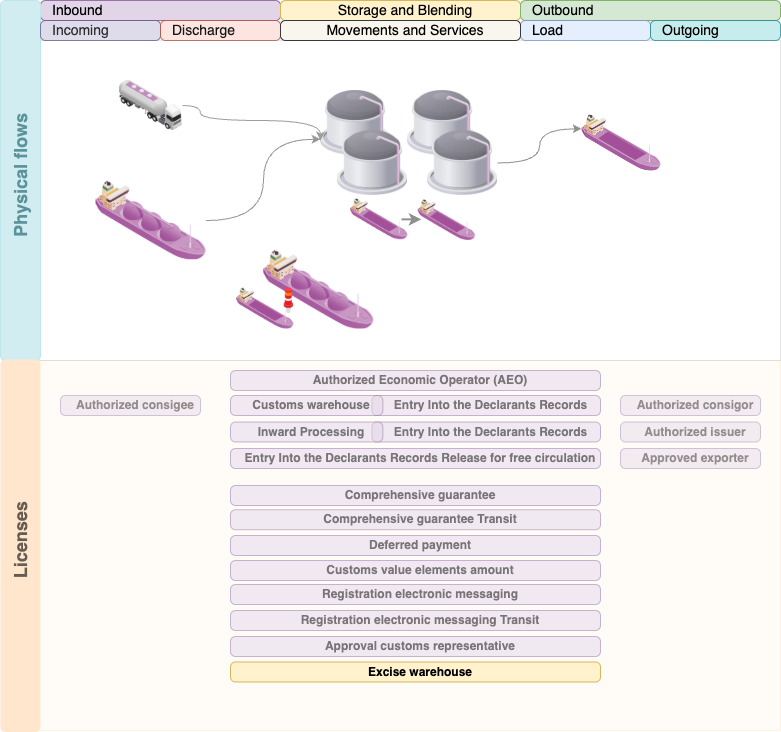
The activities at the terminal consist of the storage and transshipment, handling, processing, and transport of mineral oils. A complete overview of the relevant products is available in the product master file. The figure below provides a schematic overview of ITR?s activities. In this Administrative Organization and Internal Control (AO-IB) document, the individual goods flows and procedures are described and elaborated in more detail.
Generic processes
Inbound - Nomination process
References and process overview
No. | Document titel | Document nummer |
1 | Inbound Procedure |
|
2 | Riskmatrix | Risicomatrix 1.0 |
3 | Inbound Nomination flowchart |
|

Create Service Order and Service Order Items
Step flow | 3 - 5a |
Description | Add and register a Service order in TOS |
Risk matrix | R04 t/m R08 |
Finding(s) | Conform |

In module 2499 in OpenTas you can create a new Service order for different transaction types.

When you enter the service order, the mandatory fields for this transaction type is displayed with an
 in the data field.
 The following fields are F11 option listers retrieved from master data setup in OpenTas;
Customer
Contract
Ship
Jetty ? Terminal Masterdata
Product ? The product and applicable Taric codes combinations are configured in the masterdata.
Customs Status
Taric ? First 10 digit of the Commodity code
Taric 1 ? 11-14th position of the Commodity code
Country of Origin ? From the ISO country list
Tank ? From the terminal Masterdata
After all the data is registered in the service order, the stage will be moved from create to registered.
|
Step flow |
5a ? 6a |
|
Description |
Plan the Service order in TOS - Navigator |
|
Risk matrix |
R04 t/m R08 |
|
Finding(s) |
Conform |

After the service order entry is saved, the movement will be displayed in the planning module of OpenTas 922. From this module the movement can be planned by CSC.
|
Step flow |
5a ? 6a |
|
Description |
Plan the Service order in TOS - Navigator |
|
Risk matrix |
R04 t/m R08 |
|
Finding(s) |
Conform |

When the service order is being planned and the tank is not released for inbound or outbound transactions, the system will prompt a warning to set the tank to the correct state. Without release of the tank, the inbound or outbound cannot be scheduled from/to this tank.
|
Step flow |
5a ? 6a |
|
Description |
Release tank for transaction type |
|
Risk matrix |
R04 t/m R05 |
|
Finding(s) |
Conform |


|
Step flow |
7 |
|
Description |
Stage change management |
|
Risk matrix |
R04 t/m R08 |
|
Finding(s) |
Conform |

When all the mandatory fields for this transaction type are registered and the checks and validations are done and confirmed, the order can be moved to the stage ?Ready for execution?.
|
Step flow |
8 |
|
Description |
Assign route to this transaction to verify if the route is compatible for this discharge. |
|
Risk matrix |
R04 t/m R08, R19 |
|
Finding(s) |
Conform |


|
Step flow |
9 |
|
Description |
Ship arrival, receipt ship documentation and register A-B-C quantities |
|
Risk matrix |
R04 t/m R08, R19 |
|
Finding(s) |
Conform |


|
Step flow |
9 |
|
Description |
Ship arrival, receipt ship documentation and register A-B-C quantities |
|
Risk matrix |
R18, R20, R21 |
|
Finding(s) |
Conform |

|
Step flow |
9 |
|
Description |
Stage change management, Ready for execution and Timesheet |
|
Risk matrix |
R |
|
Internal control |
IC |
|
Finding(s) |
Conform |


|
Step flow |
9 ? 10a |
|
Description |
Stage change management to Ready for execution and Timesheet |
|
Risk matrix |
R4 ? R8, R11-R19 |
|
Finding(s) |
Conform |

Inbound - EMCS Arrival
References and process overview
No. | Document titel | Document nummer |
1 | Inbound Procedure |
|
2 | Riskmatrix | Risicomatrix 1.0 |
3 | Inbound Nomination flowchart |
|
4 | EMCS Arrival flowchart |
|

EMCS Arrival Single product - Non Blend | Add and register a Service order in TOS
Summary
This scenario describes an EMCS arrival of a T2-Excise shipment unloading in an empty tank. Before discharge the service order is created in TOS and has multiple validations and checks before the transaction can be planned and set to ready for execution.
After discharge and registration of the A-B-C-D measurements, the EAD document / EMCS Declaration must be signed off based on the registered D-measurement in TOS. When finishing and after posting of the inbound transaction in TOS, the service order is sent to the Customs Management System Descartes for processing and registration in the Excise Warehouse.
Scenario: INB-EWH 1
Flow: Inbound EMCS arrival
Barge: Noordzee
Product: ULSD
Hoeveelheid: 3.000 MT
CN code: 2710 1944 90
Douane status: T2-Excise
ARC: 25NL69C0A044DAD416CA1
EAD Quantity: 1.500.000 lt15
Origin: Belgium
Discharge in: T0308 ( Empty)
Discharge Quantity: 3.564.236 LT
Verschil: 2.064.239 lt15
|
Step flow |
9 ? 10a |
|
Description |
Stage change management to Ready for execution and Timesheet |
|
Risk matrix |
R4 ? R8, R11-R19 |
|
Finding(s) |
Conform |

|
Step flow |
11 ? 15b |
|
Description |
Registration of discharged quantities and check on allowance margins |
|
Risk matrix |
R 20 |
|
Finding(s) |
Conform |

Inbound NCTS Arrival
Reference and process overview
No. | Document titel | Document nummer |
1 | Inbound Procedure |
|
2 | Riskmatrix | Risicomatrix 1.0 |
3 | Inbound Nomination flowchart |
|
4 | NCTS Arrival flowchart |
|
