Customs Products Database
The goal of this functionality is to have a 'stand alone' Customs Product database that combines business input with data from the customs authorities regarding classification and applicable measures. The objective is to create an environment from where we offer api's that source systems can call on to ask for certain approvals and/or results.
- Customs Product Database functionalities high over
- Taric Settings
- Taric info
- Calculations Taxes
- Add Product and product Settings
- Business cases
Customs Product Database functionalities high over
Registration of Customs Products (Taric) and Products by their Trade name

A Customs Product is considered a 10 digit code (called a TARIC) specifying a Product from a customs point of view.
- The Baboon lemon;
- The Bush lemon;
- Etc.
Multiple Products by their Trade name are considered the same from a customs point of view. The Baboon lemon and the Bush lemon are both classified as "Fresh lemons" (Taric).
Taric Taric description
- 0805 50 10 10 CHAPTER 7 - EDIBLE VEGETABLES AND CERTAIN ROOTS AND TUBERS; Citrus fruit, fresh or dried; Lemons (Citrus limon, Citrus limonum); Fresh.
- Baboon Lemon
- Bush lemon
- ......
- Lemon Pulp
Taric data

Business don't want to be bothered with customs details.
Now that we have registered all the Products by their Trade name under the respective Taric, the business can just continue to 'talk their own language'. This means that when a Company indicates from their Source system to the Taric Service that they are dealing with Baboon lemons, the Taric service knows this relates to Taric code 0805 50 10 10 and can make a first selection on what data in terms of Trade Measures is applicable. An implementation of the Taric Service means that a connection/interface is created whereby the Companies source system can 'talk to' the Taric Service system.
The implementation of the Taric Service means a connection/interface must be established between a Company's source system and the Taric service
The current version on ACC covers the registration of Taric commodity codes and thereunder register products!

Optimisation would be in terms of look and feel that on the Product level the columns are separated by Lines improving the readability To do


What we want to offer is the combination of the Legal data with the practical business data.
Overview Page
Showing the Taric codes created via Create Product i.e. enter 10 digit code which is validate on existence upon save. Indeed existing the related data from the Tariff database is retrieved and stored. On this Page only the Legal description shows , the start date and the Excise additional code. The other columns are manual input in relation to Products by commercial names that are registered by he User under a Taric code. For example, under the Taric code 2707500080, you see multiple commercial Products, such as "Blend TN 160", "C7 "(Toluene)" etc.

Create Product

Via the Create Product a User specifies the 10 digit commodity code (Taric). Upon save it is validated to verify existence. If existing it is saved.

Consider the Taric code as a 'bucket'.
In addition to the mock ups, I would like to be able to add a a description describing the characteristics of the Taric code. So effectively on the main page it should show a column called Characteristics next to to the column Legal description.
After registering the 'bucket' commercial Products can be added with details that are relevant on different levels, such as on the Product level itself, start date, end date, etc. Details on a National level, related to national taxes (Country details). Lastly, details on the company level can be added, such as 'labels' created by the company itself. In this case "Quality group" and "Usual Forms of Handling".

Excise additional reference (Product Country Detail)
Below another example. Here you see the "Product Country Details" under Excise Controlled populated with Y, because from the Tariff information it is found that there is an U code, showing under "Excise Additional Reference" for Taric Code 2710201129. It could be that there are more codes available. In that case the User can choose and save his selection here. The U code is an element also showing on the main page in a column.

From the main Page, the User can also enter the Tariff information as provided by the authorities.

When selecting the details are shown similar to the website from Dutch Customs


All Blue text are hyperlinks to underlying data, e.g.

Here it should also show the duty rates, etc.
Tariff Measures Page

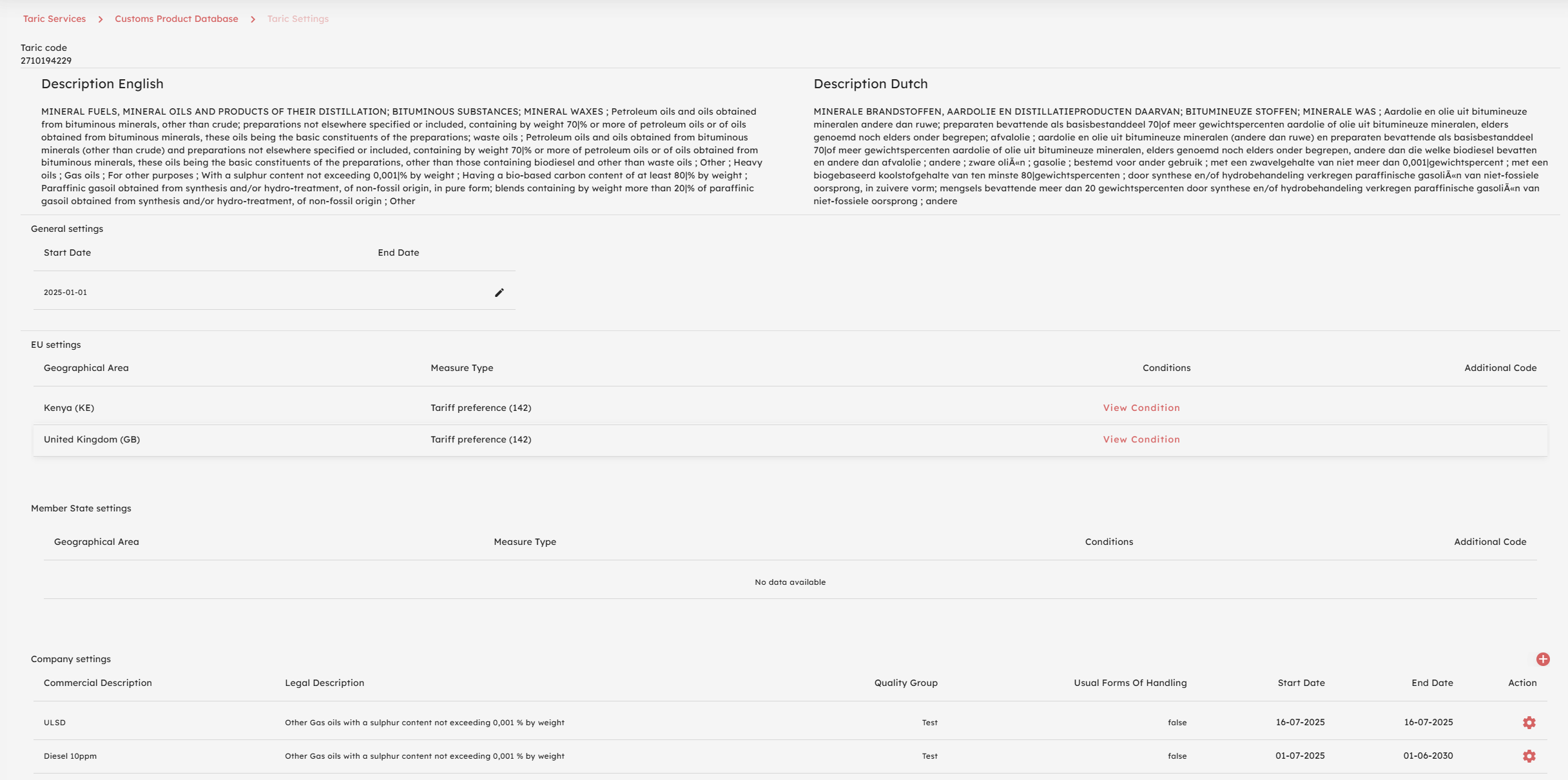
Taric Settings
Introduction
- The Taric commodity code, which is the classification of Products from an EU Customs point of view; and
- The Product by Trade name, belonging to a Taric commodity code (always one).

Taric Settings

Done

Done
EU Settings
- First the User should be able select a Measure from a List of Measures;
- This list should show only the Measures applicable to the Taric code of the Taric Settings page the User is on. It should show only the Measures relevant for EU;
- The Measures should show by Measure, meaning that if a Measure is included multiple times, because for example the Measure applies for multiple Geographical areas, it should show only once.

Taric Setting - EU settings, Improvements needed
- First column should show Measure Type. Geographical Area can be removed from the list;
- Currently it shows the National (Dutch) Measure Types, should be the EU Measure Types which are more. Please note the specification that each Measure type only shows once;
- Instead of being able to "View Conditions", the user should be able to open a dropdown showing a list of the conditions and be able to select and save a condition. For example:

Member State settings

Taric info

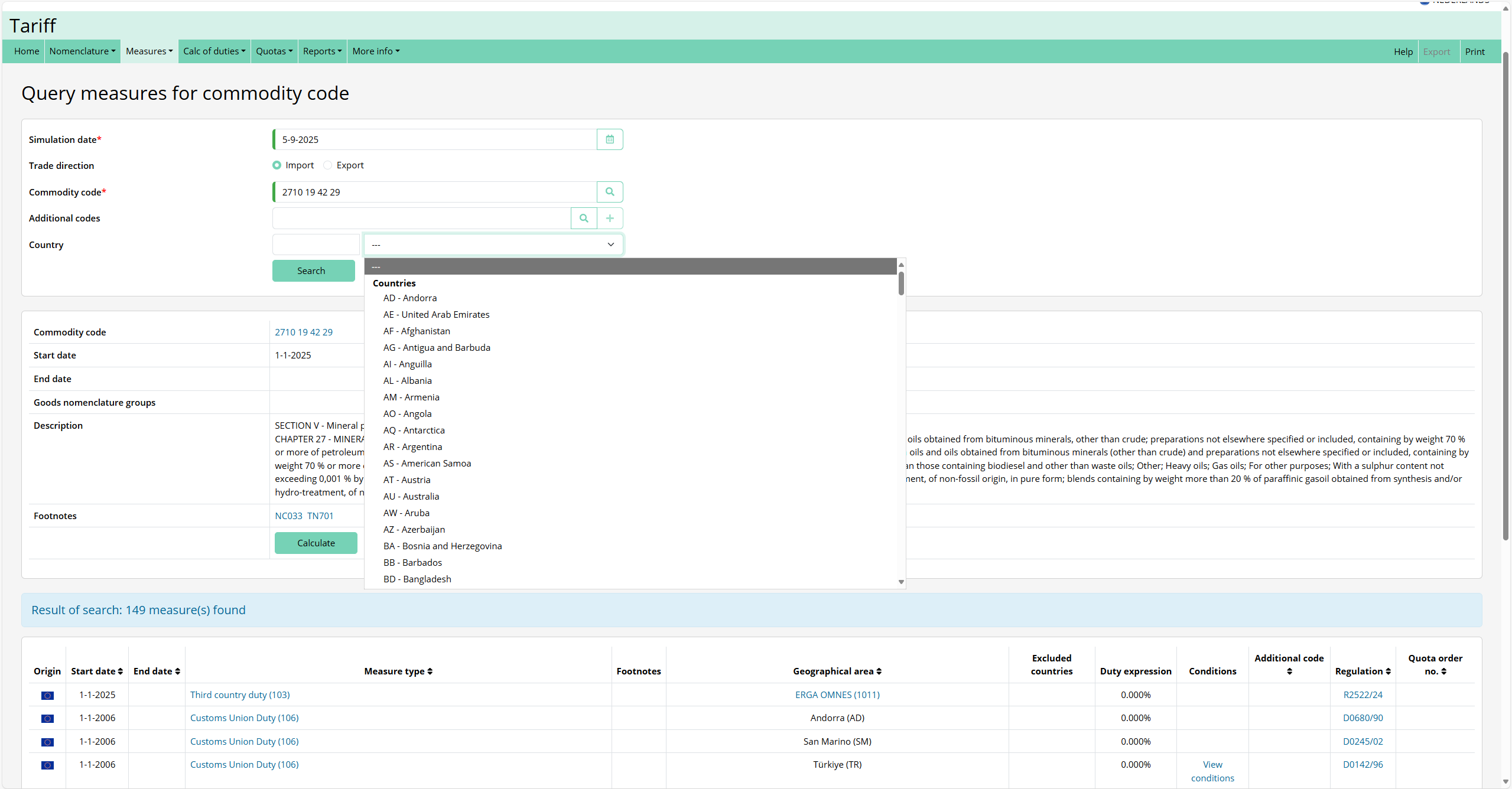
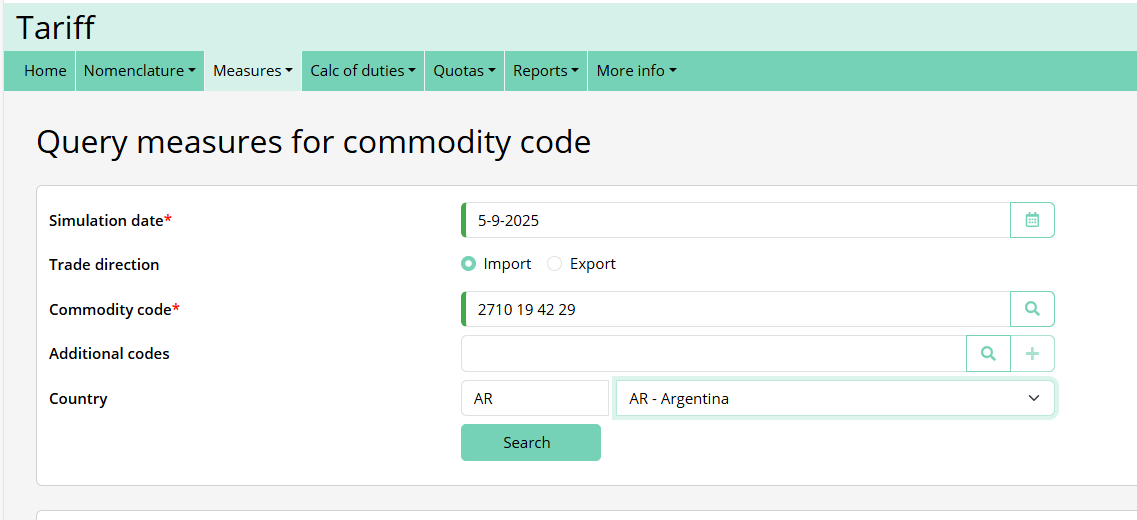


Calculations Taxes
This page describes how we calculate the tax amounts (import duties / excise / VAT etc).
Source of Products & Measures data
The data needed to calculate the tax amounts is refreshed every night using the following API for each unique taric code that we created in the CMS system. The code that uses this data to calculate the taxes is available in our package cu_tax_calculation.
Example API call to Bzctrl:
Gets the data for 2 different products, including that of their parents:
We always need the data of the parent also because any measures etc on the parent are inherited by the childs.
The response is a whole datamodel including codelists, footnotes, goodsnomenclatures, geograpahical areas, measures etc.
The input data
The input for the calculation is:
Calculation of Import duties
Based on the taric code and origin, we now always get the measure 103 (third country duties). For this measure we get the expression and the measure components:
Then based on the measurement_unit_code that we find, we fetch the correct quantity from the input. So in this example its HLT(hectoliters). Customs does not specify if HLT is at 15 degrees C or at 20 degrees C. In this case we grab the liters at 20 degrees C from the input by default (if not specified by customs for the unit) and divide it by 100.
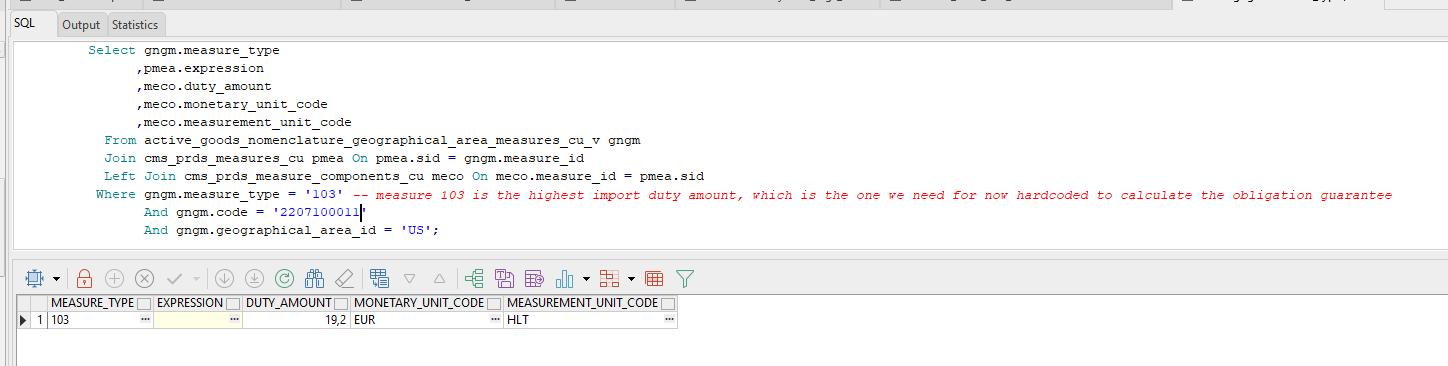
This is the logic for getting the correct quantity from the input:
.png)
If there is a measurement unit like HLT then we multiply the quantity specified in this unit with the duty amount.
If there is no measurement unit like HLT then we multiply the Customs Value with the duty amount percentage.
.png)
Calculation of Excise and Stock Tax
For excise and stock tax we calculate it in a similar way, but we get the measure based on origin and taric code and type=NLACC for excise or type=NLACVH for stock tax and the additional code like U340. This U-code is set by the system if there is only 1 available for the taric code, but if there are more than one U-codes the user has to set the correct one for the taric code in our product setup.
The difference here is that the expression can be filled.
.png)
The expression can be something like ?$Rate=(?ASV*AMOUNT(18.27,"EUR"))/100.00; $Base=?060; [$Base, $Rate, AA,060]?
To dynamically be able to calculate the tax based on the expression (we can now handle all the different expressions) we first extract the base unit of measure:
.png)
Also this is not always the same format, sometime its &BASE1, sometimes its $Base etc. The unit can be 063 or 060 for example, which we then map on Liters at 15 degrees C or Liters at 20 degrees C from the input.
Then we transform the expression into a usable calculation:
.png)
Then based on the calculation and the quantity we calculate the amount to be paid.
Excise is not always based on an expression, if its not we calculate it in the same way as the import duties (fetch the duty amount and multiply it by the quantity).
Calculation of VAT
For VAT we get the percentage based on the type=NLBTW and the additional code (U340 in this case) and the taric code and origin.
Then we just apply this percentage.
.png)
Calculation of Obligation Guarantee
For the calculation of the obligation guarantee we combine the calculated Import duties, Excise, Stock tax and VAT like so:
.png)
We calculate the vat based on the customs value + import duty amount + excise amount multiplied by the VAT percentage.
Then we round all the taxes on 2 decimals just like the customs website does and sum it all up.
Obligation guarantee = Import Duties + Excise + Stock tax + VAT
Add Product and product Settings

- Mention the Taric code in the Left top like now, but make it a link that when the user should click it the user opens the Taric Settings page in a new Window;
Business cases
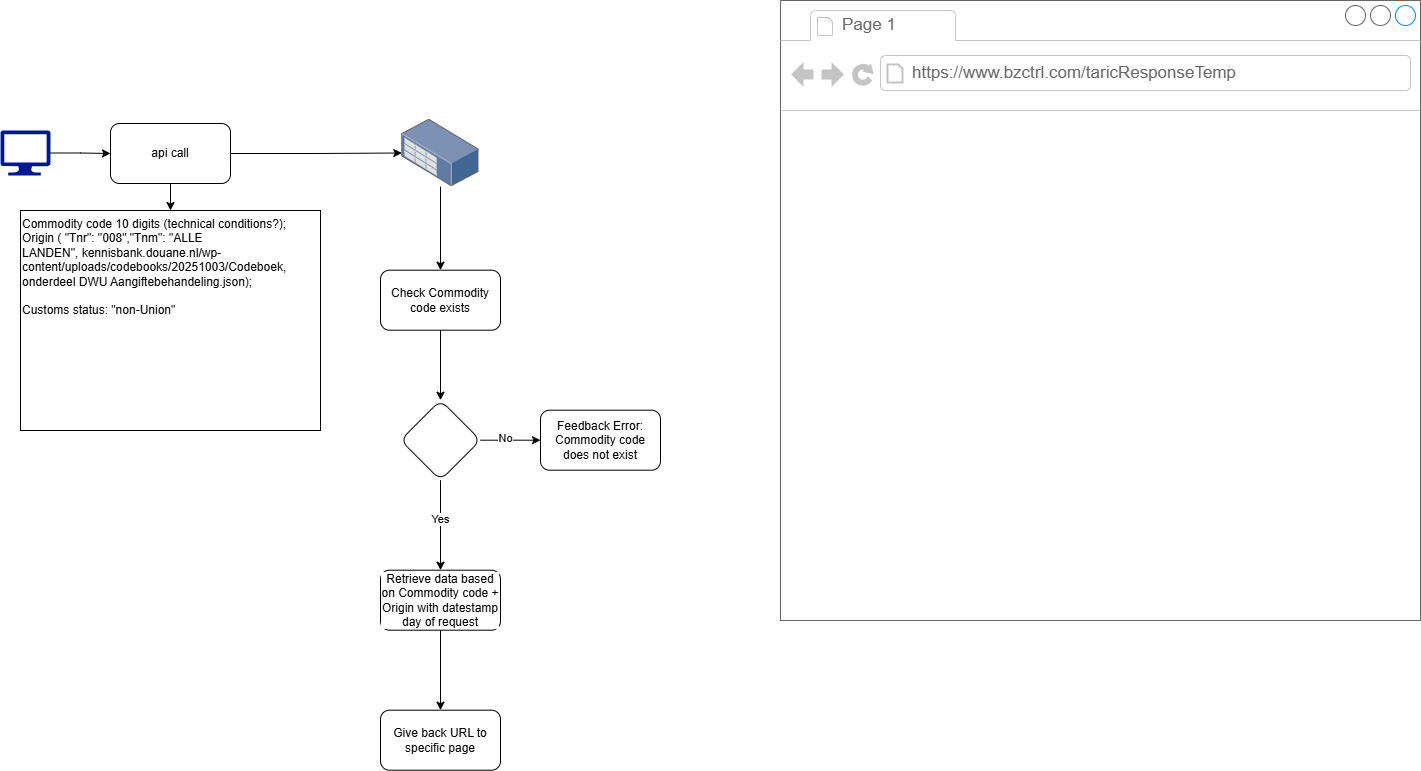
Customer calls for an api to to Customs Product and Measures data
- 10 digit commodity code; and
- an Origin.