# Use cases

<div>This Chapter provides some use cases on which basis the functionality of BzCtrl. is explained.</div>

# Engaging Business Partners in Compliance Procedures

<div id="bkmrk-instead-of-receiving">Instead of receiving documentation from business partners via email for manual review and archiving, streamline and control the process using a SnapForm.

Start by defining which documents are required per order. Then include control questions that allow your business partner to confirm upfront the checks you would normally perform upon receipt of the documentation. For example:

</div><div id="bkmrk--1">  
</div><div id="bkmrk--2">![editor_17_5_8e6bab8f-67d8-4536-90fd-1062763b3813_rte_image_539.png](https://www.bzctrl.com/bzctrl-core-api/api/v1/download/editor_17_5_8e6bab8f-67d8-4536-90fd-1062763b3813_rte_image_539.png)</div><div id="bkmrk--3">  
</div><div id="bkmrk-once-completed%2C-make">Once the setup is completed, publish it as a SnapForm.</div><div id="bkmrk-">  
</div><div id="bkmrk--4">![editor_17_5_e05cce5a-d5b6-4c1d-b3c8-a472b4cfb1ef_rte_image_543.png](https://www.bzctrl.com/bzctrl-core-api/api/v1/download/editor_17_5_e05cce5a-d5b6-4c1d-b3c8-a472b4cfb1ef_rte_image_543.png)</div><div id="bkmrk--5">  
</div><div id="bkmrk-and%C2%A0link-it-to-the-r">Link the SnapForm to the relevant Workspace, in this case the Workspace for **DMR Trading**.  
</div><div id="bkmrk--7"><span>  
</span></div><div id="bkmrk--8" style="cursor: auto; text-align: center;">![editor_17_5_efb2cc38-25e3-4d07-97d4-1bd36606a38e_rte_image_549.png](https://www.bzctrl.com/bzctrl-core-api/api/v1/download/editor_17_5_efb2cc38-25e3-4d07-97d4-1bd36606a38e_rte_image_549.png)</div><div id="bkmrk--9" style="cursor: auto;"></div><div id="bkmrk--10" style="cursor: auto;">  
</div><div id="bkmrk-now-it-is-available-" style="cursor: auto;"><div class="qMYqUG_convSearchResultHighlightRoot"><div class="" data-is-intersecting="true" data-turn-id-container="request-6983b721-729c-8325-8e01-1fdf8cecb96b-26"><section class="text-token-text-primary w-full focus:outline-none has-data-writing-block:pointer-events-none [&:has([data-writing-block])>*]:pointer-events-auto R6Vx5W_threadScrollVars scroll-mb-[calc(var(--scroll-root-safe-area-inset-bottom,0px)+var(--thread-response-height))] scroll-mt-[calc(var(--header-height)+min(200px,max(70px,20svh)))]" data-scroll-anchor="false" data-testid="conversation-turn-68" data-turn="assistant" data-turn-id="request-6983b721-729c-8325-8e01-1fdf8cecb96b-26" data-turn-id-container="request-6983b721-729c-8325-8e01-1fdf8cecb96b-26" dir="auto"><div class="text-base my-auto mx-auto pb-10 [--thread-content-margin:var(--thread-content-margin-xs,calc(var(--spacing)*4))] @w-sm/main:[--thread-content-margin:var(--thread-content-margin-sm,calc(var(--spacing)*6))] @w-lg/main:[--thread-content-margin:var(--thread-content-margin-lg,calc(var(--spacing)*16))] px-(--thread-content-margin)"><div class="[--thread-content-max-width:40rem] @w-lg/main:[--thread-content-max-width:48rem] mx-auto max-w-(--thread-content-max-width) flex-1 group/turn-messages focus-visible:outline-hidden relative flex w-full min-w-0 flex-col agent-turn"><div class="flex max-w-full flex-col gap-4 grow"><div class="min-h-8 text-message relative flex w-full flex-col items-end gap-2 text-start break-words whitespace-normal outline-none keyboard-focused:focus-ring [.text-message+&]:mt-1" data-message-author-role="assistant" data-message-id="856db547-f4a1-421d-b4b0-4d449544b15e" data-message-model-slug="gpt-5-5" data-turn-start-message="true" dir="auto" tabindex="0"><div class="flex w-full flex-col gap-1 empty:hidden"><div class="markdown prose dark:prose-invert wrap-break-word w-full light markdown-new-styling">The SnapForm is now available under the **DMR Trading** Workspace.

</div></div></div></div></div></div></section></div></div></div><div id="bkmrk-here-you-can-generat" style="cursor: auto;">![editor_17_5_bdab1b0c-dc45-48f6-87b8-774292195e56_rte_image_566.png](https://www.bzctrl.com/bzctrl-core-api/api/v1/download/editor_17_5_bdab1b0c-dc45-48f6-87b8-774292195e56_rte_image_566.png)   
   
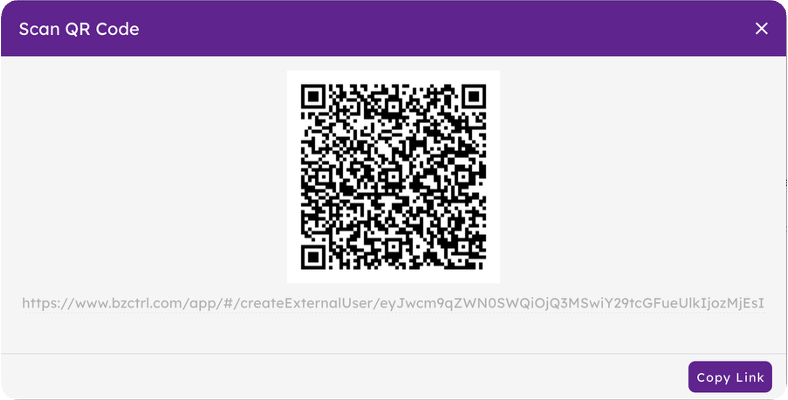
Here you can generate the QR code or URL for the SnapForm.  
</div><div id="bkmrk--12" style="cursor: auto;">  
</div><div id="bkmrk--13" style="cursor: auto; text-align: center;">![editor_17_5_69afee6a-de53-4de4-8f66-0a4103a9d916_rte_image_576.png](https://www.bzctrl.com/bzctrl-core-api/api/v1/download/editor_17_5_69afee6a-de53-4de4-8f66-0a4103a9d916_rte_image_576.png)</div><div id="bkmrk--14" style="cursor: auto; text-align: center;">  
</div><div id="bkmrk-share-this-link-with">Share this URL or QR code with your business partner, in this case your contact at DMR Trading.

Each time the QR code or URL is used, a new Form instance is automatically created in the **DMR Trading** Workspace. DMR Trading will only have access to the submitted Forms, while your organization can manage and review them directly within the BzCtrl. environment.

</div><div id="bkmrk--16"><span>  
</span></div><div id="bkmrk--17" style="cursor: auto;">![editor_17_5_cccb014d-b4ab-47e4-83d3-e63596f36dd7_rte_image_157.png](https://www.bzctrl.com/bzctrl-core-api/api/v1/download/editor_17_5_cccb014d-b4ab-47e4-83d3-e63596f36dd7_rte_image_157.png)</div><div id="bkmrk--18" style="cursor: auto;">  
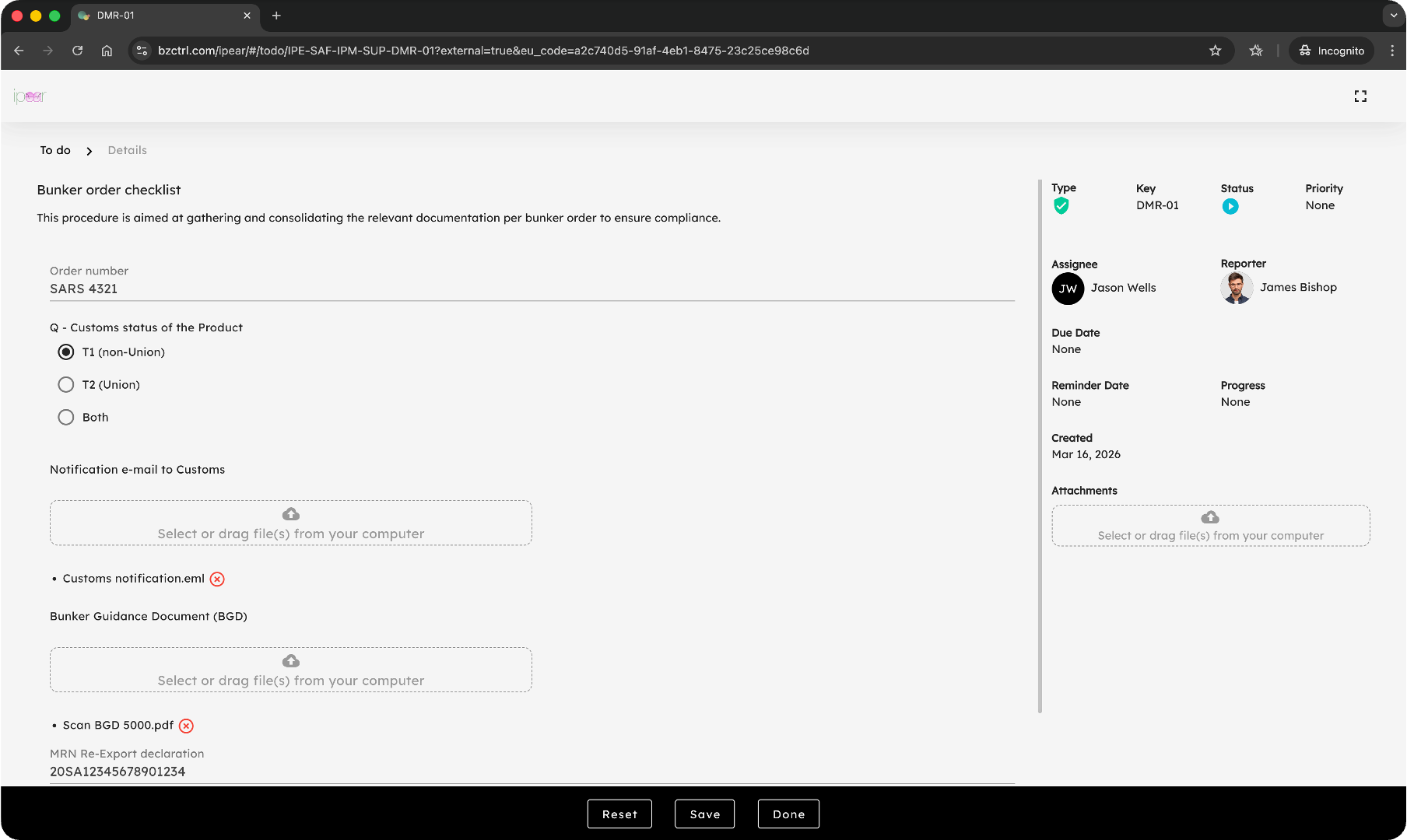
</div><div id="bkmrk-jason-from-dmr-tradi" style="cursor: auto;">Jason from DMR Trading will see the Form as an External User, without requiring access to the BzCtrl. environment itself.  
</div><div id="bkmrk--19" style="cursor: auto;">  
</div><div id="bkmrk--20" style="cursor: auto;">![editor_17_5_12d0b855-7693-4ed5-afb3-6045140df90d_rte_image_589.png](https://www.bzctrl.com/bzctrl-core-api/api/v1/download/editor_17_5_12d0b855-7693-4ed5-afb3-6045140df90d_rte_image_589.png)</div><div id="bkmrk--21" style="cursor: auto;">   
</div><div id="bkmrk-the-company-can-acce" style="cursor: auto;">The company retains full access to all Forms, allowing it to monitor status and verify completeness and accuracy of the submitted information.  
</div><div id="bkmrk--22" style="cursor: auto;">  
</div><div id="bkmrk--23" style="cursor: auto;">![editor_17_5_ff46b967-8e3a-4cfd-8099-acedde8c5fe4_rte_image_603.png](https://www.bzctrl.com/bzctrl-core-api/api/v1/download/editor_17_5_ff46b967-8e3a-4cfd-8099-acedde8c5fe4_rte_image_603.png)</div><div id="bkmrk--24" style="cursor: auto;">   
</div><div id="bkmrk-that%27s-it%21-all-nicel" style="cursor: auto;">That’s it! Everything is automatically and properly archived, including all relevant attachments.

Note that if it is already known that Jason or a specific group of users will be using the SnapForm, this can also be configured directly in advance.

</div><div id="bkmrk--26" style="cursor: auto;">  
</div><div id="bkmrk--27" style="cursor: auto;">![editor_17_5_a7fce336-35b9-4711-9db7-ee13bb618d5f_rte_image_619.png](https://www.bzctrl.com/bzctrl-core-api/api/v1/download/editor_17_5_a7fce336-35b9-4711-9db7-ee13bb618d5f_rte_image_619.png)</div><div id="bkmrk--28" style="cursor: auto;">   
</div><div id="bkmrk-that-way-no-need-to-" style="cursor: auto;">This avoids the need to include full details each time the SnapForm is used; instead, usage can simply be confirmed.  
</div><div id="bkmrk--29" style="cursor: auto;">  
</div><div id="bkmrk--30" style="cursor: auto;">![editor_17_5_abb3ce41-299d-4236-b56a-cf754a43f58a_rte_image_637.png](https://www.bzctrl.com/bzctrl-core-api/api/v1/download/editor_17_5_abb3ce41-299d-4236-b56a-cf754a43f58a_rte_image_637.png)</div><div id="bkmrk--31" style="cursor: auto;">  


</div><div id="bkmrk--32" style="cursor: auto;"><span>  
</span></div><div id="bkmrk--33"><span>  
</span></div><div id="bkmrk--34"><span>  
</span></div><div id="bkmrk--35"><span>  
</span></div><div id="bkmrk--36">   
</div><div id="bkmrk--37">   
</div>