Features in BzCtrl.
These features can be used across multiple Pages and Workspaces to simplify daily operations and improve efficiency.
Features such as ApiForm and SnapForm also enable integration with external users and systems, allowing data to be exchanged and processes to connect seamlessly across platforms.
Additional information and feature updates can also be found on the official website: BzCtrl.
- External System Integration - ApiForms
- External System Integration - Incidents & Tasks
- ApiForm instruction - VTTI specific
External System Integration - ApiForms
BzCtrl. provides the ability to call predefined Forms through API communication using the ApiForms feature. This allows external systems to create and link Form instances directly from within their own operational processes.
The main value of ApiForms is that a user can launch a specific Form directly from the source system, while the created Form instance remains permanently accessible through a stored URL within that source system.
How ApiForms Work
Each ApiForm provides a unique API endpoint that allows an external system to create a new Form instance in BzCtrl.
The request includes:
- Predefined Form reference (via API Endpoint)
- Tags and identifiers (for example an Order Number, Shipment Number, or Case ID).
Once the Form instance is created, BzCtrl. returns a response containing the direct URL to the Form instance. This URL can then be stored in the source system, allowing users to always reopen the corresponding Form directly from their operational process.
User actions


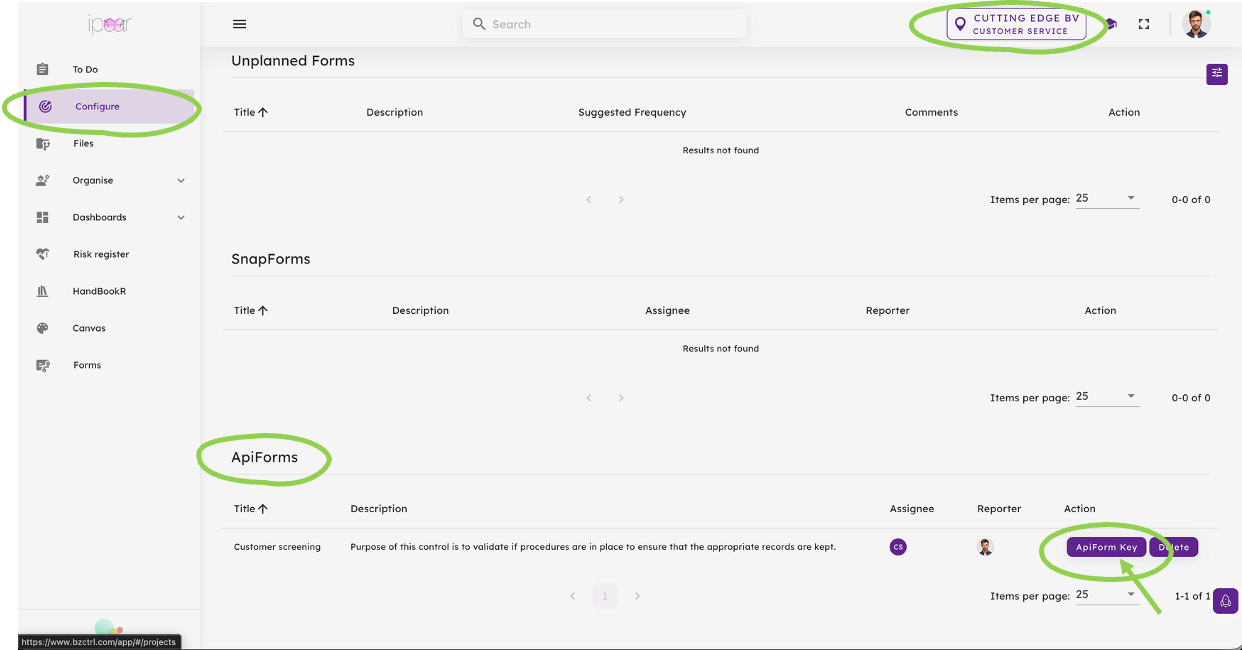
Step 3 - From the Configure page the Form is now available as ApiForm. Please make sure the correct Workspace is selected (right top). From the ApiForms Table select the ApiForm Key Button to get the details to share with your developers.
Input to Developers External system
Step 1 - Authentication
Before an ApiForm can be called, the external application must authenticate with BzCtrl. Authentication is performed by sending a POST request to the appropriate authentication endpoint using credentials provided for API communication.
Endpoints
Acceptance Environment (ACC)
https://acc.bzctrl.com/bzctrl-core-api/oauth/token
Production Environment (PROD)
https://bzctrl.com/bzctrl-core-api/oauth/token
Request Method
POST
Request Body (x-www-form-urlencoded)
grant_type=password
username=example@example.com
password=Ex@mpl3!
Sample Response
{
  "access_token": "xxxxxxxxxx",
  "refresh_token": "xxxxxxxxxx",
  "token_type": "Bearer",
  "expires_in": 3600,
  "scope": "*",
  "jti": "xxxxxxxxxx"
}
Result
Upon successful authentication, BzCtrl. returns an access token that must be included in subsequent API requests. The token serves as proof of authentication and authorizes communication with the BzCtrl. API. The token remains valid for the period specified in the expires_in field.

After creation the Response message includes a Tasklink that can be stored to allow the user access to the Form Instance from the External system at any stage.
External System Integration - Incidents & Tasks
BzCtrl. provides a feature that allows external systems to create Incidents and Tasks directly through REST API communication. This enables operational systems to register issues or actions directly within their own workflows while ensuring follow-up and tracking take place in BzCtrl.
The main value of this feature is that it allows Incidents and Tasks to be created directly from specific screens or processes within an external operational system, without requiring users to manually enter data into BzCtrl.
Integration Flow
The integration process consists of the following steps:
The request contains the information required to create the Incident (or Task) in BzCtrl.
Step 1 - Authentication
Before an ApiForm can be called, the external application must authenticate with BzCtrl. Authentication is performed by sending a POST request to the appropriate authentication endpoint using credentials provided for API communication.
Endpoints
Acceptance Environment (ACC)
https://acc.bzctrl.com/bzctrl-core-api/oauth/token
Production Environment (PROD)
https://bzctrl.com/bzctrl-core-api/oauth/token
Request Method
POST
Request Body (x-www-form-urlencoded)
grant_type=password
username=example@example.com
password=Ex@mpl3!
Sample Response
{
  "access_token": "xxxxxxxxxx",
  "refresh_token": "xxxxxxxxxx",
  "token_type": "Bearer",
  "expires_in": 3600,
  "scope": "*",
  "jti": "xxxxxxxxxx"
}
Result
Upon successful authentication, BzCtrl. returns an access token that must be included in subsequent API requests. The token serves as proof of authentication and authorizes communication with the BzCtrl. API. The token remains valid for the period specified in the expires_in field.
Step 2 - Create Incident (or Task)
ACC: https://acc.bzctrl.com/bzctrl-core-api/api/v1/task/add-task
PROD: https://www.bzctrl.com/bzctrl-core-api/api/v1/task/add-task
Note: The access token received from the OAuth Token API must be included in the Authorization header using the Bearer scheme.
Request Method: POST
Required Headers
Content-Type: application/json
Authorization: Bearer {access_token}
Sample Request Body
{
"todoType":"INCIDENT",
"domainWorkSpace":"EXA-CON-BUS-WOR",
"title":"Potential Customs claim",
"description":"Operation started without proper approvals",
"financialImpact":"123577",
"impact":"HIGH",
"likelihood":"MEDIUM",
"status":"IN PROGRESS",
"priority":"HIGH",
"assignee":"Example@example.com",
"reporter":"Example@example.com",
"category":["Customs"],
"subCategory":["IT"],
"lrn":"725462",
"orderID":"ORDER 777",
"reminderDate":"2024-09-27"
}
Sample Response
{
"title":"Potential Customs claim",
"taskType":"INCIDENT",
"description":"Operation started without proper approvals",
"taskLink":"https://www.bzctrl.com/app/#/todo/EXA-CON-BUS-WOR-03",
"tags":["ORDER 777"]
}
| Todo Type | Fields | Input | Comments |
| incident, task | todoType* | INCIDENT | Customer - option to change to Task (or in case only used for Incidents default value) |
| incident, task | domain* | EXA-CON-BUS-WOR | Default value to include by Customer, relates to the Domain |
| incident, task | workspace* | WOR | Default value to include by Customer, relates to the Workspace under the Domain |
| incident, task | title* | Free text field | Customer, allow user to provide Title/Subject |
| incident, task | description* | Free text field | Customer, allow user to provide Description |
| task | result | Free text field | Customer, allow user to provide Results (optional) |
| incident | financialImpact | Numbers field | Customer - For User it should be clear this is a EUR amount. Only Number is provided. BzCtrl. - This should be included in the Field "Potential financial impact of the incident" set as EUR. |
| incident | impact | High, Medium, Low | Customer, allow user to select out of these three options (optional) |
| incident | likelihood | High, Medium, Low | Customer, allow user to select out of these three options (optional) |
| incident, task | status* | In Progress | Options BzCtrl. are To do, In Progress, Done and Expired. Customer - default when sending on In Progress, with option to change by User to Done. BzCrtrl. - If status - Done, set due date to date transaction. |
| incident, task | priority | High, Medium, Low | Customer, allow user to select out of these three options (optional) |
| incident, task | assignee* | User@example.com | Customer, Same as Reporter. E-mail address of the User. |
| incident, task | reporter* | User@example.com | Customer, E-mail address of the User. |
| incident, task | category | n/a | |
| incident, task | orderID* | ServiceOrder Number | Customer - BzCrtrl. - Set as Tag |
| incident, task | LRN | LRN | Customer - BzCrtrl. - Set as Tag (if available handy reference) |
| incident, task | reminderDate | Calendar selection | n/a |
ApiForm instruction - VTTI specific
BzCtrl. provides the ability to call predefined Forms through API communication using the ApiForms feature. This allows external systems to create and link Form instances directly from within their own operational processes.
The main value of ApiForms is that a user can launch a specific Form directly from the source system, while the created Form instance remains permanently accessible through a stored URL within that source system.
How ApiForms Work
Each ApiForm provides a unique API endpoint that allows an external system to create a new Form instance in BzCtrl.
The request includes:
- Predefined Form reference (via API Endpoint)
- Tags and identifiers (for example an Order Number, Shipment Number, or Case ID).
Once the Form instance is created, BzCtrl. returns a response containing the direct URL to the Form instance. This URL can then be stored in the source system, allowing users to always reopen the corresponding Form directly from their operational process.
User actions
Step 3 - From the Configure page the Form is now available as ApiForm. Please make sure the correct Workspace is selected (right top). From the ApiForms Table select the ApiForm Key Button to get the details to share with your developers.
Input to Developers External system
Step 1 - Authentication
Before an ApiForm can be called, the external application must authenticate with BzCtrl. Authentication is performed by sending a POST request to the appropriate authentication endpoint using credentials provided for API communication.
Endpoints
Acceptance Environment (ACC)
https://acc.bzctrl.com/bzctrl-core-api/oauth/token
Production Environment (PROD)
https://bzctrl.com/bzctrl-core-api/oauth/token
Request Method
POST
Request Body (x-www-form-urlencoded)
grant_type=password
username=cms@api.com
password=Nologicincustoms#24
Sample Response
{
  "access_token": "xxxxxxxxxx",
  "refresh_token": "xxxxxxxxxx",
  "token_type": "Bearer",
  "expires_in": 3600,
  "scope": "*",
  "jti": "xxxxxxxxxx"
}
Result
Upon successful authentication, BzCtrl. returns an access token that must be included in subsequent API requests. The token serves as proof of authentication and authorizes communication with the BzCtrl. API. The token remains valid for the period specified in the expires_in field.
ApiForm Key - Production Environment (PROD)
After creation the Response message includes a Tasklink that can be stored to allow the user access to the Form Instance from the External system at any stage.